VisionPro Display 3D Status Bar
If Cognex Designer is running on a PC with a CPU that does not support the Advanced Vector Extensions 2 (AVX2) instruction set, then the 3D Tools of VisionPro cannot be used in the project. Cognex Designer indicates the lack of AVX2 support in its Output window with the following warning:
AVX2 instruction set is not supported on this machine: VisionPro 3D functionality will not be available.
Using any of the VisionPro 3D tools in the project if AVX2 is unsupported will result in project crashes or errors.
The VisionPro Display 3D Status Bar inserts a VisionPro Cog3DDisplayV2StatusBar on to the Page, which provides information about the image in the display to which it is configured. When the mouse hovers over the image, it provides information about the X, Y and Z values where the cursor is located.
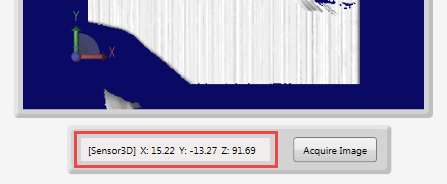
To display the status information, set the Selected Display property to a 3D display object (for example, Pages.Page.VisionProDisplay3D).