Displaying Query Results in a Table
Query results can be directly connected on a Page to a Table Page User Inputs, for display purposes.
-
Set the Source property of the Table to the query that you would like to display.
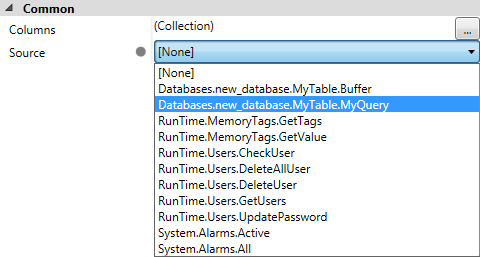
- The Table will automatically generate the appropriate table columns, and, once connected, the Table control will automatically update the display of the rows whenever the query or source table are updated.
In addition, a Button control can be added and configured using the GetSelectedRow function to retrieve items from the table.
For example, if a Button (in conjunction with the Table) was added to the Page above, the following script in the On Mouse Click script point could be used to retrieve data from the table (the example assumes that the Data Type in the first column is a String, and the second column contains an Integer Data Type; otherwise, the cast operation will throw an exception):
Cognex.Designer.Database.DataRow myRow = $Pages.Page.MyTable.GetSelectedRow();
$Name = (string)myRow.ItemArray[0];
$Count = (int)myRow.ItemArray[1];