Timers
There are two Timer Components that can be used to execute custom code at a specified "tick" interval.
High Precision Timer
The High Precision Timer is useful for executing code at very small intervals (for example high-speed functionality, reading I/O lines), with a higher degree of accuracy. It can be set to an interval of 1 millisecond.
There are a limited number of High Precision Timers available per system; Cognex recommends that no more than 3 or 4 High Precision Timers be used, per project.
Standard Timer
The Standard Timer is suitable for most user-interface updates, and other non-critical items (or example, updating the HMI status periodically). It can be set to an interval of 20-30 milliseconds.
There is no limit on how many standard timers you can run per project.
Note: The standard timer runs on the UI thread, so it can block the UI if a long running process is performed in the OnTick() script.
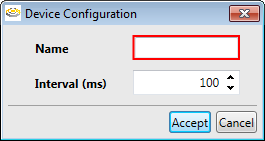 | |
|---|---|
| Control | Description |
| Name | The name of the timer. |
| Interval | The rate at which the timer should tick, in milliseconds. |
Tags & Functions
| Tag | Description |
|---|---|
| Start() | Function that starts the timer. |
| Stop() | Function that stops the timer. |
| IsRunning | A Boolean tag indicating whether or not the timer is running. |
| OverrunCount | Measures the time taken to run the OnTick() script; if the time to run the OnTick() script is longer than the specified Interval value, the OverrunCount value will be incremented by 1. Note: The OverrunCount tag only applies to the High Precision Timer. |