Cognex Designer Integrated Development Environment
This section describes the Integrated Development Environment (IDE) of Cognex Designer. This is used to develop your machine vision application prior to deployment.
Graphical Features of the IDE
The Cognex Designer IDE supports the following graphical features;
- Rich Text, making pin names more readable
- Multi-line Text that can be used when adding labels
- Arrowheads available with lines
- Enhanced Zoom-in and Zoom-out capability
Cognex Designer IDE Areas
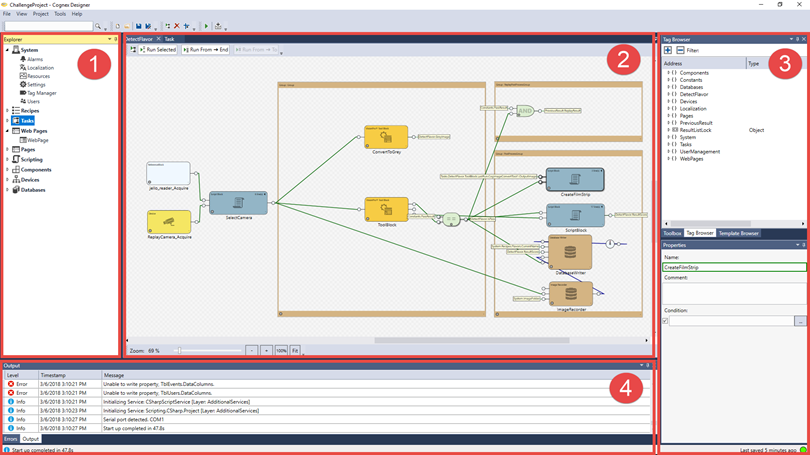
The Cognex Designer IDE is structured into four main areas.
Tip: Cognex Designer supports customizing the development environment through dock-able windows, so the environment can be re-arranged to the user's preferences.
-
The Project Explorer, which is used to add, configure and organize everything within your project.
-
The Project Editors, which are used to construct your project:
-
The Project Windows area, which are used to navigate your project:
-
The Project Diagnostics area is used to monitor your project:
Note: For more information related to how to use Cognex Designer, please see the Developing a Cognex Designer Project topics.