Network Configuration
You use the Cognex Comm Card Configurator to set the following network parameters:
- TCP/IP addressing mode (DHCP or Static)
- Network address and subnet (Static mode only)
- Host name and (optionally) station name for PROFINET
- Settings, Remote Station and Device Addressing for SLMP
There are two methods to launch the Cognex Comm Card Configurator:
- From the Installer, select the Utilities tab and double-click on the Cognex Comm Card Configurator icon.
- Select Cognex -> VisionPro -> Utilities -> Cognex Comm Card Configurator.
The Configurator displays the following window:
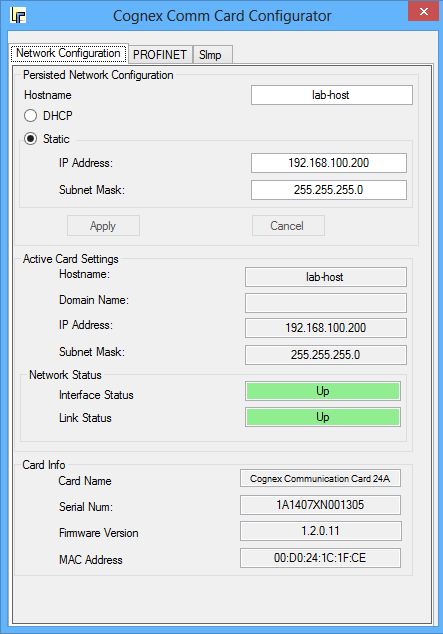
You can use the controls at the top of the window to specify the host name, select between DHCP and static addressing, and in the case of static addressing, specify the IP address and subnet mask. You should select the network settings that are appropriate for the network to which the card is connected.
The Active Card Settings portion of the window displays the current settings of the card. These settings may be different from the card's stored settings in some cases (such as when a PROFINET device alters the active card settings). Whenever you change a setting and press Apply, both the active and stored settings are updated.
The Network Status portion of the window displays the current link status (whether the device is physically connected to a network) and interface status (whether the activated IP settings permit the card to communicate on an IP network).