Creating a New Project with Project Types
In order to use a Predefined Project Type, you must create a Cognex Designer project with a Project Type other than Blank Project.
Predefined projects contain a number of preconfigured components, for example a Camera Acquire block.
Tip: If you have a physical camera defined to your system, it is automatically connected and a block representing that camera is included in your project. If no physical camera is defined to your system, a default Camera1_Acquire block is created that can be associated with a physical camera or an simulated image source.
Create a Project and set one of the following values as your Project Type:
- Single Camera - Select the Single Camera option to set up a project for a single camera, single task application. A VisionPro tool block, a Script block, and an Image Recorder block are included.
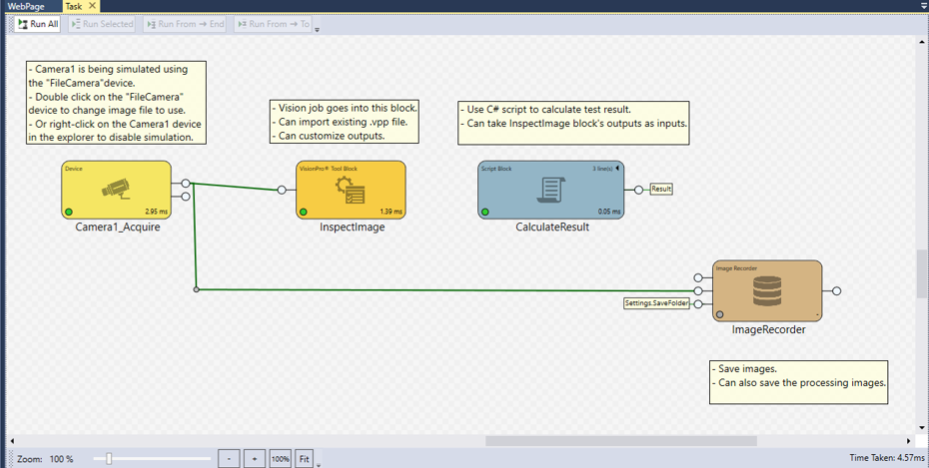
- Multi Camera - Select the Multi Camera option to set up a project for multiple camera, single task applications. In addition to the preconfigured blocks in the Single Camera example, an additional script block is included that calculates totals from all four acquisition processes.

- Independent Multi Camera - To set up a project for multiple-camera, multiple-task applications, select the Independent Multi-Camera option. The Independent Multi-Camera option and the Single Camera option have the same defined task blocks. However, in the Independent Multi-Camera option, Cognex Designer runs each task independently from the other tasks.
