WebHMI Settings
The WebHMI Settings are used to configure the authentication access of users and an inactivity timeout. For procedural steps to follow when working with WebHMI Settings, see WebHMI: A Functional Overview.
The Enable Web Server property enables or disables hosting a web server instance on the specified port.
To add extra security, you may want to enable an automatic timeout (in minutes) to prevent authentication with WebHMI after a certain period of inactivity by the user. When the set Inactivity Timeout value expires, the dialog is locked and authentication is required to proceed.
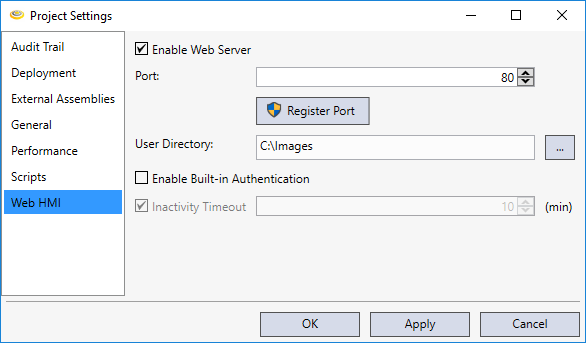
The ability to require a login to access all of the Web Pages can be controlled by setting the Enable Built-in Authentication setting for all of the WebPages contained in a project. When enabled, this setting covers all of the WebPages in a project, and cannot be applied selectively to an individual WebPage.
This will force a user to enter user credentials (user name and password) when accessing a project from a Web browser during deployed mode. The default WebPage will only load if the user is able to successfully log in; otherwise, the login dialog will continue to be displayed.
While the project is in deployed mode, the Inactivity Timeout determines the interval for user interaction with the PC running the WebPage HMI. When this setting is enabled (it is enabled by default), the current user will be logged off and all WebPage Elements that require authorization will become disabled if there has not been any interaction during the specified time period.