TCP/IP Client
Creates a TCP client which connects to the TCP server at the port and address configured.
If you have already created and connected to a TCP/IP device (Client and/or Server), and then want to deploy the project to a new environment that has another TCP/IP device with different configuration options, the TCP/IP device will have a broken link icon beside it.
-
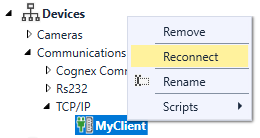
To use the new device, from the Project Explorer, right-click on the TCP/IP device and select Reconnect.
-
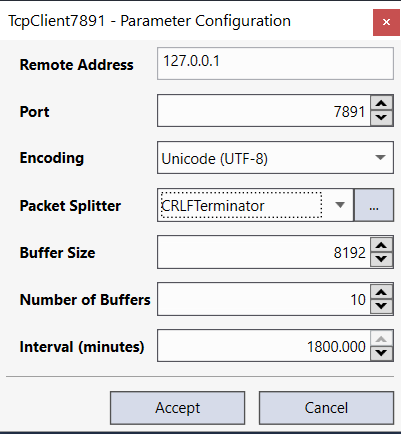
This will launch the Parameter Configuration dialog, which will allow you to reconfigure the settings accordingly (allowing you to retain any previously constructed scripts).
|
|
|
|---|---|
| Control | Description |
| Remote Address | The IP Address of the TCP Server. |
| Port | Specifies the port number over which to communicate; this TCP port must be open across all firewalls in order to work. |
| Packet Splitter |
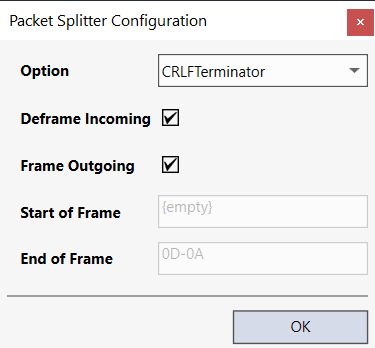
The method to use (and options) to automatically detect packet structure. Open the Packet Splitter Configuration to determine how to detect / split received TCP packets based on an expected format using start and/or end byte sequence to frame a message.
|
| Buffer Size |
Specifies the size (minimum 1 byte, maximum 67108864 bytes; default = 8192) of the received data buffer for the TCP client device. The buffers are used to queue incoming messages. For example, if the Receive Data block is being used in a Task, and the block executes after the message was actually received, the message will be stored in the buffer, and processed the next time the block executes. Note: This setting can be used in conjunction with the Receive Data block.
|
| Number of Buffers |
Specifies the number of buffers (minimum 1 buffer, maximum 65536 buffers; default = 10) for the received data for the TCP client device. Note: This setting can be used in conjunction with the Receive Data block.
|
| Interval (minutes) | The number of minutes between Keep-Alive packets being sent to the server. |
 Events
TCP Client hooks into the OnDataReceived event.
Before invoking the OnDataReceived method, ensure that if you transmit ASCI text, all data sent and received must be ASCI text and both sender and receiver must be using the same encoding algorithm. Sending or receiving non-ASCI text may result in data loss and unexpected results.
| Event | Description |
|---|---|
| OnDataReceived |
This event triggers when Designer receives data from the server. If PacketSplitter is configured, this will only trigger when the received data matches the expected configuration as defined by the Packet Splitter Option. There are two parameters:
|
| OnRawDataReceived |
This event triggers when Designer receives data from the server. There are two parameters:
|
| OnConnected | This event triggers when the client establishes the connection with the server. NB In development mode the OnConnected will re-fire upon entering test mode. Supports the parameter TcpClient internalClient, which is the underlying object. Typically not required, but can be useful for setting advanced parameters through the internalClient.Client.SetSocketOption() function. |
| OnDisconnected | This event triggers when the server explicitly closes the connection |
Methods
The TCP/IP Client has two methods:
| Method | Description |
|---|---|
| Send (message) | Sends a message to the client's server. |
| Flush () | Flushes all buffers of the device by script. This method can be used to consume the device's buffers if it is not consumed otherwise (e.g. an attached Receive Data block). |