NDM Event Handlers
When your PLC application changes the value of an NDM signal, the NDM will issue one of the events listed in the following table.
| CardStatus | The NDM raises this event when the Comm Card reports very specific status or error events to the vision system. These events are typically used to inform the vision system of important "out of band" information that cannot be reported synchronously. Sign up for the CardStatus event, and use the StatusCode property of the event arguments to identify which status event code is being reported by the Comm Card. |
| ClearError |
The NDM raises the ClearError event to inform the vision system that the remote device has been notified of an error reported by the vision system and the error has been be cleared. Handle this event to know when the remote device has acknowledged an error and normal operation can continue. |
| JobChangeRequested |
The NDM raises the JobChangeRequested event to inform the vision system that the remote device has requested a job change. Handle this event and use the JobID property of the event arguments to determine which job to load. |
| NewUserData |
The NDM raises the NewUserData event to tell the vision system that new user data has arrived from the remote device. Handle this event and call ReadUserData(Int32, Int32) to read the new user data. Note that changes to the user data present on the remote device cannot be read until the remote device signals the vision system that new user data is available by sending a "Set User Data" signal. The remote device can send separate "Set User Data" signals for each user data channel. Use the ChannelIndex property of the event arguments to determine which "Set User Data" signal was received. Upon returning from the event handler, the remote device is automatically notified by sending the “Set User Data Acknowledge” signal. |
| OfflineRequested |
The NDM raises the OfflineRequested event to tell the vision system that it should go offline. Handle this event and use the ReturnToPreviousState property of the event arguments to determine whether to transition the vision system offline or return it to its previous state. |
| ProtocolStatusChanged |
The NDM raises the ProtocolStatusChanged event to inform the vision system that the status of the underlying protocol has changed. Handle this event and use the RemoteAddress and ProtocolStatus properties of the event arguments to determine how the protocol status has changed. |
| TriggerAcquisition |
The NDM raises the TriggerAcquisition event to inform the vision system that the remote device has requested an image Acquisition. Handle this event and use the CameraIndex property of the event arguments to determine which camera should perform the image acquisition. Set the ResponseCode property of the event arguments to notify the remote device if an acquisition error has occurred. |
| TriggerAcquisitionDisabledError | The NDM raises the TriggerAcquisitionDisabledError event to tell the vision system that an acquisition trigger was set but the acquisition trigger was not enabled. |
| TriggerAcquisitionNotReadyError |
The NDM raises the TriggerAcquisitionNotReadyError event when the remote device asserts a "Trigger Camera" signal high without waiting for the vision system to signal that it's ready to receive triggers by setting the "Trigger Ready" signal high. Handle this event and use the CameraIndex to identify which camera channel was triggered before it was ready. Your user code should call NotifyAcquisitionComplete(Int32, Int32) to signal that the vision system that it has completed the current acquisition and is ready to receive another "Trigger Camera" signal from the remote device. |
| TriggerAcquisitionStop |
The NDM raises the TriggerAcquisitionStop event to tell the vision system that the Acquisition trigger has been reset. Handle this event and use the CameraIndex property of the event arguments to determine which camera trigger was reset. |
| TriggerSoftEvent |
The NDM raises the TriggerSoftEvent event to inform the vision system that the remote device has requested that a soft event execute. Handle this event and use the SoftEventID property of the event arguments to determine which soft event should execute. Set the ResponseCode property of the event arguments to notify the remote device of the status of the soft event when the event handler returns. |
| TriggerSoftEventOff |
The NDM raises the TriggerSoftEventOff event to tell the vision system that the soft event trigger bit has been reset. Handle this event and use the SoftEventID property of the event arguments to determine which soft event has been reset. |
If you want your application to respond to one of these events, you must create a script point for the event by following these steps:
- Connect to the Cognex Communication Card device.
-
Right click on the connected device and select the event to handle.
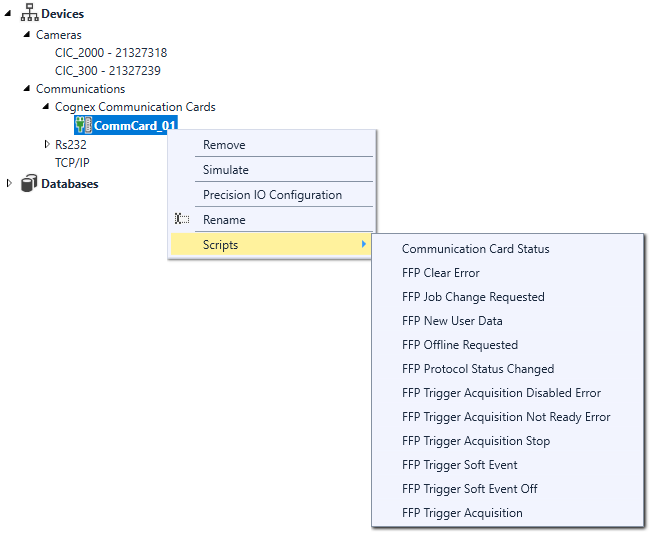
- Implement the event handling script.
There are some important restrictions to keep in mind while writing event notification functions:
- You should avoid writing an event handler that takes a long time to execute.
- Your event handler must not throw any unhandled exceptions.
- Your event handler should not attempt to manipulate any HMI elements.
In most cases, your event handler will set the value of a tag, and your application will implement a data change script that runs when the tag value changes.
For example, the following script fragments show the event handler for the Trigger Acquisition event along with the associated data change script.
The event handler script simply sets the $doTrigger tag to true:
e.ResponseCode = CogNdmTriggerAcquisitionResponseCodeConstants.Success;
// Set tag to indicate trigger has occurred
$doTrigger=true;
The associated data change script implements the acquisition and inspection:
//Acquire an image
$Devices.myCam.Acquire();
//Perform the inspection
$Tasks.Task.Run();
//Increment the inspection number
++$ResultCount;
...