Sample Code for a Block Plugin
Here is a small sample code for a block plugin and a little explanation after the code:
using System;
using System.Collections.Generic;
using System.Linq;
using System.Text;
using Cognex.Designer.Core;
using Cognex.Designer.Scripting;
using Cognex.Designer.Sequences;
using Cognex.Designer.Scripting.Internal;

namespace Cognex.Designer.ExampleBlocks
{
	[DisplayName("My Custom Block")]
	[Category("Example Code.Math.Test.ETC")]
	public class MyCustomBlock : ConfigurableBlock
	{
		private GenericPin<double> _input1;
		private GenericPin<double> _output1;

		public MyCustomBlock()
			{
				_input1 = CreateInputPin<double>("Input1");
				_output1 = CreateOutputPin<double>("Output1");
			}

		[DisplayName("Multiplier")]
		[Category("Behavior")]
		[BlockProperty(ConfigurationOption.All, ConfigurationOption.Editable)]

		public double Multiplier { get; set; }

		protected override void ExecuteTask()
			{
				_output1.Value = _input1.Value*Multiplier;
			}
	}
}
This block in Cognex Designer:
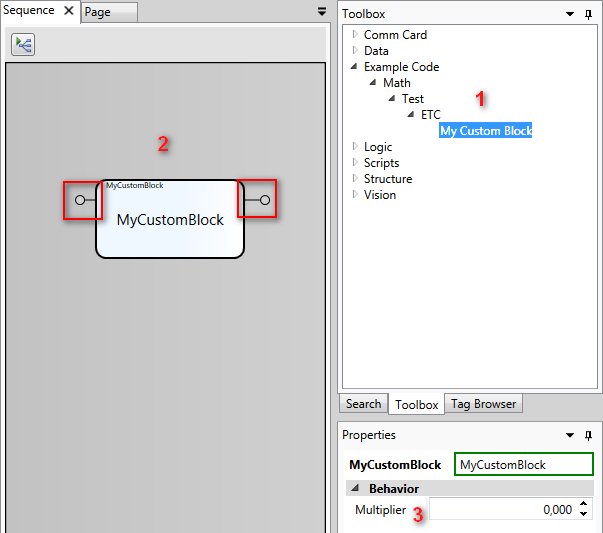
- [DisplayName] and [Category] determine the name of the plugin and where you can find it.
- This block has one input and one output pin ("Input1" and "Output1").
- Multiplier appears in the Behavior [Category("Behavior")] section in Designer; it can be configured and it has all the configuration options.
-
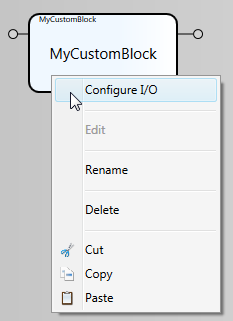
[BlockProperty] determines whether you can configure the block (right-click) and what options you can choose (ConfigurationOption.All, ConfigurationOption.Editable)].
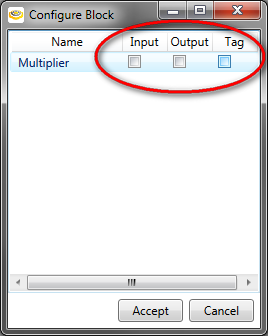
You can choose from the following options:
-
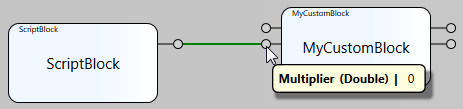
Input: Multiplier gets its value via an input pin (from another block).
-
Output: Multiplier provides a value (e.g the result) via an output pin.

-
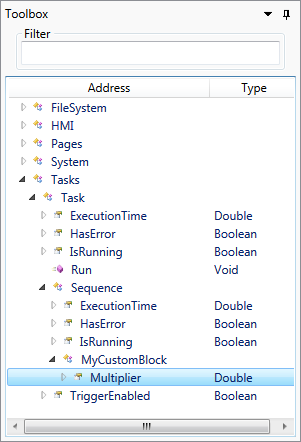
Tag: Multiplier appears in the Toolbox and you can use it for scripting purposes, for example: $Tasks.Task.Task.MyCustomBlock.Multiplier
-
-
In ExecuteTask, you can determine how your Block behaves, in this case, the Multiplier feature.
public double Multiplier { get; set; }

protected override void ExecuteTask()
{
	_output1.Value = _input1.Value*Multiplier;
}