RS232
The Cognex Designer RS232 device allows you programmatic access to a serial port on the PC.
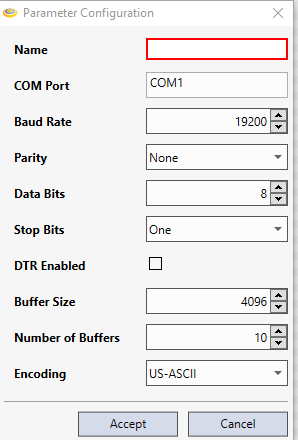
|
|
|---|---|
| Control | Description |
| Name | Specifies the name of the serial device. |
| COM Port |
Specifies the serial port connection. Note: When connecting to a Vision Controller, Designer displays COM1 and COM2 as possible COM Port settings; use COM1.
|
| Baud Rate | Specifies the baud rate for the connection. |
| Parity | Specifies the parity-checking protocol for the connection. |
| Data Bits | Specifies the standard length of data bits, per byte, for the connection. |
| Stop Bits | Specifies the standard number of stop bits, per byte, for the connection. |
| DTR Enabled | Specifies whether or not to enable the Data Terminal Ready (DTR) signal during serial communication (disabled by default). |
| Buffer Size |
Specifies the size (minimum 1 byte; default = 4096) of the received data buffer for the serial device. Note: This setting can be used in conjunction with the Receive Data block.
|
| Number of Buffers |
Specifies the number of buffers (minimum 1 buffer; default = 10) for the received data for the serial device. Note: This setting can be used in conjunction with the Receive Data block.
|