Configuring Precision I/O Events via API
The API supports the CogPrio, the CogPrioEvent, and the CogPrioEventCollection classes for creating precision I/O events and configuring them to interact with a precision I/O event system.
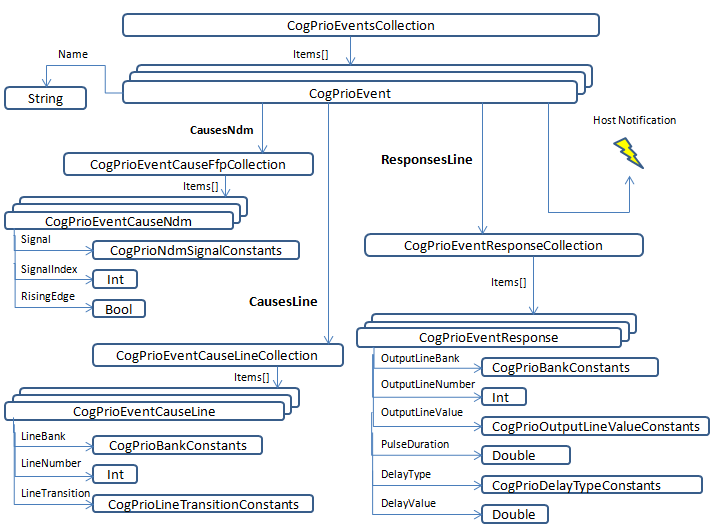
Each precision I/O event holds a possible collection of CogPrioEventCauseLine and CogPrioEventResponseLine objects, and events do not interrupt the PC unless you explicitly configure it to do so by subscribing for HostNotification. Once your precision I/O event collection has been defined, your vision application calls the EnableEvents method to allow the Cognex Communication Card to respond to any signals that are defined as event causes.
The following example creates a single precision I/O event that triggers a light connected to discrete output line 0 in response to a signal on discrete input line 0, and then adds this event to an event collection (you would typically include this code as part of your application's OnStartup script):
// Get the connected comm card
//
if(! $Devices.CommCard.IsConnected)
	{
	$System.Log.Write("Connected CommCard Device not found.");
	return null;
	}

// Access the underlying VisionPro object

CogCommCard card = $System.GetInternalObject("Devices.CommCard") as CogCommCard;

// access the discrete io object

CogDiscreteIOAccess dioAccess = card.DiscreteIOAccess;
CogPrio mPrio = dioAccess.GetActivePrecisionIO();

// create the precision I/O event.

if (mPrio != null)
	{
	mPrio.Events.Clear();
	mPrio.DisableEvents( );

	CogPrioEvent turnOnLight = new CogPrioEvent( );
	turnOnLight.Name = "Enable the Red Light";

	CogPrioEventCauseLine mCause = new CogPrioEventCauseLine
	(CogPrioBankConstants.InputBank0, 0, CogPrioLineTransitionConstants.LowToHigh);
	turnOnLight.CausesLine.Add(mCause);

	// Turn on the light for 1 second after a 3 second delay

	CogPrioEventResponseLine mResponse = new CogPrioEventResponseLine
	(CogPrioBankConstants.OutputBank0, 0, CogPrioOutputLineValueConstants.SetHigh, 1000, CogPrioDelayTypeConstants.Time, 3000);
	turnOnLight.ResponsesLine.Add(mResponse);

	// Adds this event to the event collection

	mPrio.Events.Add(turnOnLight);

	// Verify validity (and display cause if not valid)

	if (!mPrio.Valid)
		{
		$System.Log.Write("Invalid PrIO state: " + mPrio.ValidationErrorMsg);
		}
	else
		{
		mPrio.EnableEvents();
		}
	}