C# Sample Code for a Page Plugin
The C# code for the LED:
using System;
using System.Windows.Media;
using Cognex.Designer.Core;
using Cognex.Designer.Core.Functions;
using Cognex.Designer.Scripting;
namespace MyLEDWpfControlLibrary
{
 /// <summary>
 /// Interaction logic for MyLED.xaml
 /// </summary>
 [DisplayName("Green LED"), Category("User Controls"), Description("Green LED indicator")]
 public partial class MyLED : Cognex.Designer.HMI.Controls.Element
 {

  #region Member Variables
  private bool _isLEDOn;
  private bool _eventsSubscribed = false;
  #endregion

  #region Constructors
  public MyLED()
  {
    InitializeComponent();
    SubscribeToEvents();
  }
  #endregion

  #region Public Properties
  [DisplayName("Is LED On"), Category("Common"), Editable(), Bindable(), Published()]
  public bool IsLEDOn
  {
    get { return _isLEDOn; }
    set {
      _isLEDOn = value;
      SetLED();
      NotifyChange("IsLEDOn");
        }
  }
  [DisplayName("LED Width"), Category("Common"), Editable(), Bindable()]
  public double MyLEDWidth
  {
    get { return MyLEDBody.Width; }
    set
      {
        MyLEDBody.Width = value;
      }
  }
  [DisplayName("LED Height"), Category("Common"), Editable(), Bindable()]
  public double MyLEDHeight
  {
    get { return MyLEDBody.Height; }
    set
      {
        MyLEDBody.Height = value;
      }
  }
  #endregion

  #region Protected Methods
  protected override void SetFocus()
  {
    MyLEDBody.Focus();
  }

  protected override ScriptablePoint[] GetAllScriptPoints()
  {
    ArgumentDescriptor rParam1 = new ArgumentDescriptor("sender", typeof(object));
    ArgumentDescriptor rParam2 = new ArgumentDescriptor("e", typeof(EventArgs));
    var runParams = new ArgumentDescriptor[] { rParam1, rParam2 };
    Type returnType = typeof(void);
    var leftClickScriptPoint = new ScriptablePoint("OnLeftClick", "On Mouse Left-Click",
    "Script that runs when the LED is Left-Clicked", runParams, returnType);
    return new ScriptablePoint[] { leftClickScriptPoint, MouseMoveScriptPoint, MouseEnterScriptPoint, MouseLeaveScriptPoint };
  }
  #endregion

  #region Private Methods
  private void SetLED()
  {
    SolidColorBrush mySolidColorBrush = new SolidColorBrush();
    switch (_isLEDOn)
    {
      case true:
        mySolidColorBrush.Color = Colors.SpringGreen;
        MyLEDBody.Fill = mySolidColorBrush;
        break;
      case false:
        mySolidColorBrush.Color = Colors.Black;
        MyLEDBody.Fill = mySolidColorBrush;
        break;
    }
  }
  void MyLEDBody_MouseLeftButtonDown(object sender, System.Windows.Input.MouseButtonEventArgs e)
  {
    NotifyChange("IsLEDOn");
    RunScript("OnLeftClick", sender, e);
  }
  private void SubscribeToEvents()
  {
    if (_eventsSubscribed)
      return;
    else
      _eventsSubscribed = true;

    MyLEDBody.MouseLeftButtonDown += MyLEDBody_MouseLeftButtonDown;
  }
  #endregion
  }
}
C# code explained:
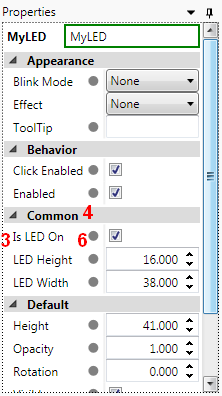
This plugin exposes three public properties:
- IsLEDOn – whether the LED is on
- MyLEDWidth – the width of the LED
- MyLEDHeight – the height of the LED
See as they appear in the property grid below in the figure about Properties.
Attributes used on the class:
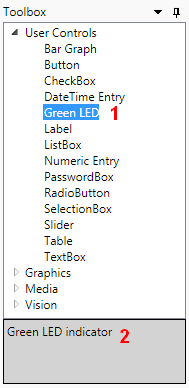
- The [DisplayName()] and [Category()] attributes determine the name of the plugin and where you can find it.
-
The [Description()] attribute determines the displayed description for the plugin.
Attributes used on the public properties:
- [DisplayName()] – the name of the property as it is displayed.
- [Category()] – the category under which the property appears.
- [Editable()] – whether an editor will be displayed for this property. If this attribute is not applied on the property, then the property will not be displayed in the property grid (Properties). Therefore, Cognex recommends that you always apply this attribute on your public properties that you want to expose.
- [Bindable()] – whether the value of this property can be bound using the Expression Builder.
- If the property is bindable, a grey dot appears next to it. Refer to the Binding Properties topic for details.
-
[Published()] – whether the property is available from the script. The control has to have at least one published property to be visible while scripting.
Methods used:
- Use the NotifyChange() method to notify Cognex Designer that the value of the property has changed. It is used for the IsLEDOn property because it may change often during runtime. However, the MyLEDWidth and MyLEDHeight properties are not intended to be changed during runtime, therefore, NotifyChange() is not used in their setters.
- Use the SetFocus() method if the control can be used for user input. If the control has a TextBox, for example, this method sets the focus on the control so that the user can type into it. The LED sample exposes a mouse left-click scriptable point, so SetFocus() is used in this case as well.
Scriptable points declared:
Use scriptable points to add scripting capability to certain events. The scriptable points will be selectable from the context menu of the control.
The LED sample defines the following scriptable point (in addition to the default MouseMoveScriptPoint, MouseEnterScriptPoint, and MouseLeaveScriptPoint scriptable points):
var leftClickScriptPoint = new ScriptablePoint("OnLeftClick", "On Mouse Left-Click", "Script that runs when the LED is Left-Clicked", runParams, returnType); where
- "OnLeftClick", the first argument, is the unique ID for the script. You use this ID as an argument in RunScript() invoked to call the script; in the LED sample: RunScript("OnLeftClick", sender, e);
- "On Mouse Left-Click", the second argument, is the displayed name of the script.
- "Script that runs when the LED is Left-Clicked", the third argument, is the tooltip (description) for the script.
- runParams, the fourth argument, is an array of the expected parameters to the script event.
- returnType, the fifth argument, sets the type of the value the script is expected to return.
The resulting context menu:
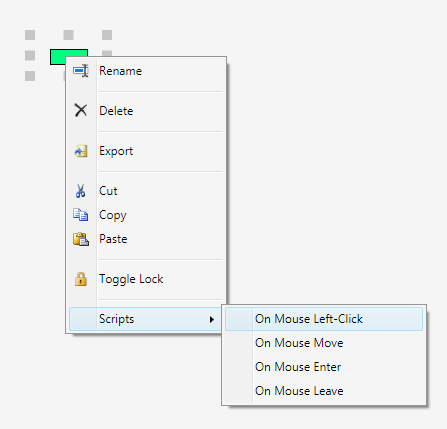
The list in the braces defines all the events that user-defined scripts can be attached to:
return new ScriptablePoint[] { leftClickScriptPoint, MouseMoveScriptPoint, MouseEnterScriptPoint, MouseLeaveScriptPoint };