CC24 Simulator
The CC24 device is used to establish a connection to a simulation I/O card of a Cognex Vision Controller or a standalone PC I/O card.
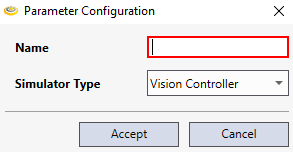
To add a CC24 simulator device, right-click Cognex Communication Cards, then select Add > 'CC24 Simulator' Device.
Tip: This Device option is helpful when the communication card cannot be connected to during development.
|
|
|---|---|
| Control | Description |
| Name | Specifies the name of the device. |
| Simulator Type | Specifies the type of I/O card to simulate, a PC I/O card or a Vision Controller I/O card. |