Configuring Multiple GPUs
VisionPro Deep Learning 4.1 supports the use of multiple GPUs for training Training is the process that your tool, which is a neural network, is learning about the features (pixels) based on the labels you made. For example, a tool will learn the defect/normal pixels in each image based on the defect/normal labels you drew. The goal of the tool Training is learning enough to give the correct inspection results of whether an unseen image is defective or not. The key to training is to ensure that you include all possible variations within your training set, and that your images are accurately labeled. Training times vary by the application, tool setup and the GPU in the PC being used to train the network. and processing. Using multiple GPUs has the following benefits:
- Increase system throughput Throughput refers to the total number of images that can be processed per unit of time. If your application can process multiple streams concurrently using different threads, it might be possible to improve system throughput, although individual tool processing is slower. when your application uses multiple threads to simultaneously process images.
- Increase training productivity, by allowing you to train multiple tools at the same time.
However, using multiple GPUs does not reduce tool training or processing time.
If you want to configure multiple GPUs, use GPUs of the same type and of the same specification. For example, if you try to set up three GPUs using the RTX 3080 10 GB model A specific spatial arrangement of a set of features (Blue Locate and Blue Read tools only.) During a post-processing step, the Blue Locate and Blue Read tools can fit all of the features detected in an image to the models defined for the tool. The overall pose and identity of the model is then returned., then all three GPUs should be RTX 3080 10 GB.
When configuring a host system for multiple GPUs, keep the following in mind:
- The chassis might need to provide up to 2 KW of power.
- Do not enable Scalable Link Interface (SLI).
- Make sure that the PCIe configuration has 16 PCIe lanes available for each GPU.
- NVIDIA RTX / Quadro® and Tesla cards provide better cooling configuration for multiple-card installations.
Operational Modes
VisionPro Deep Learning has the following operational modes for using multiple GPUs:
- SingleDevicePerTool
Default setting. A single GPU is used for training and processing an image. - NoGPUSupport
This setting specifies that a GPU is not to be used.
You can specify these GPU modes on the initialization of the library through the C and .NET APIs.
Multiple GPUs for Training
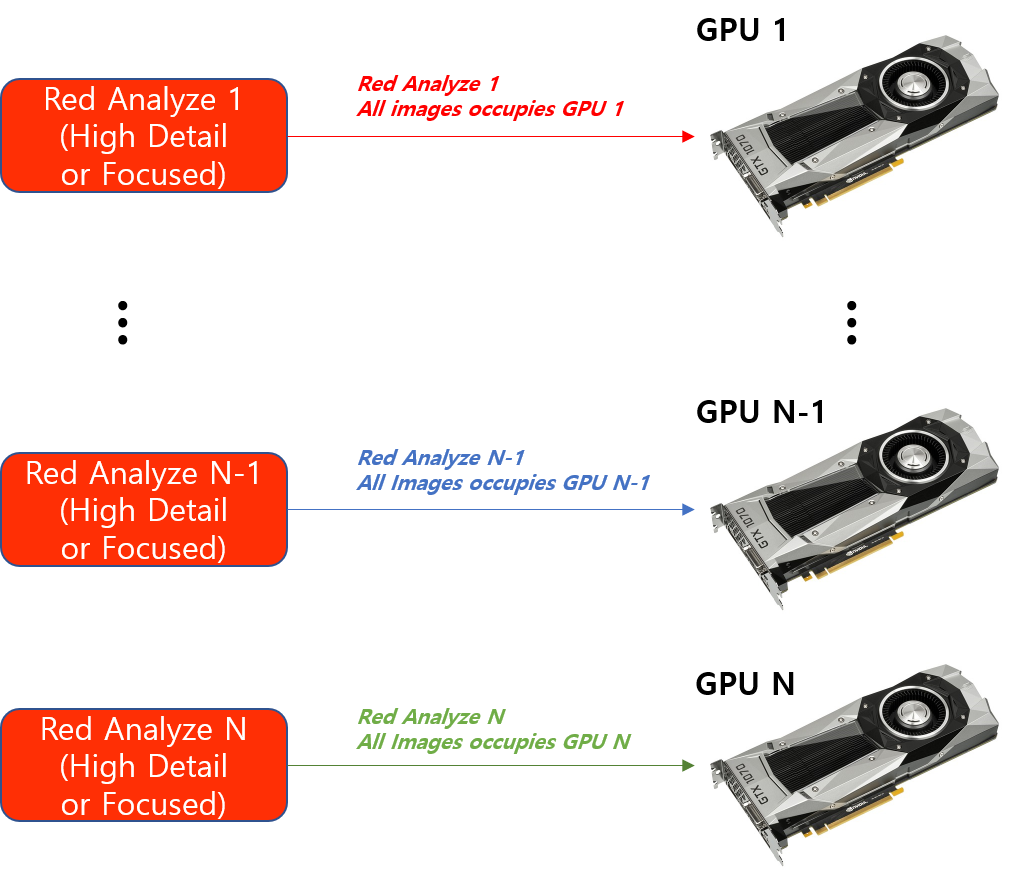
If you have N GPUs and N training jobs (N tools to be trained), one training job is taken only by one GPU. This means that if you have N GPUs, you can run N training jobs at the same time and if you have N GPUs, you can train N tools at the same time.
When using multiple GPUs for training, a single tool is trained on only a single GPU.
The training jobs in another Stream or another Workspace can be accessed by the multiple GPUs registered in your system and thus they also can be executed concurrently with multiple GPUs.
Multiple GPUs for Processing
When using multiple GPUs for processing, the situation is different.
-
Legacy type tools
A single tool is simultaneously processed on all the available GPUs registered on your system.
-
Standard modes
A single tool is processed on only a single GPU.
This has the following implications:
-
For processing with Legacy type tools:
-
If you have N GPUs and if you run one processing job (processing one Legacy type tool), you can run this job in a distributed way on these N GPUs.
-
If you have N GPUs and if you run N processing jobs (processing N Legacy type tools), you can run these N jobs in parallel on these N GPUs.
-
-
For processing with Standard mode tools, it is basically no different from training.
-
With N GPUs, you can run N processing jobs simultaneously.
-
With N GPUs, you can process N tools at the same time.
-
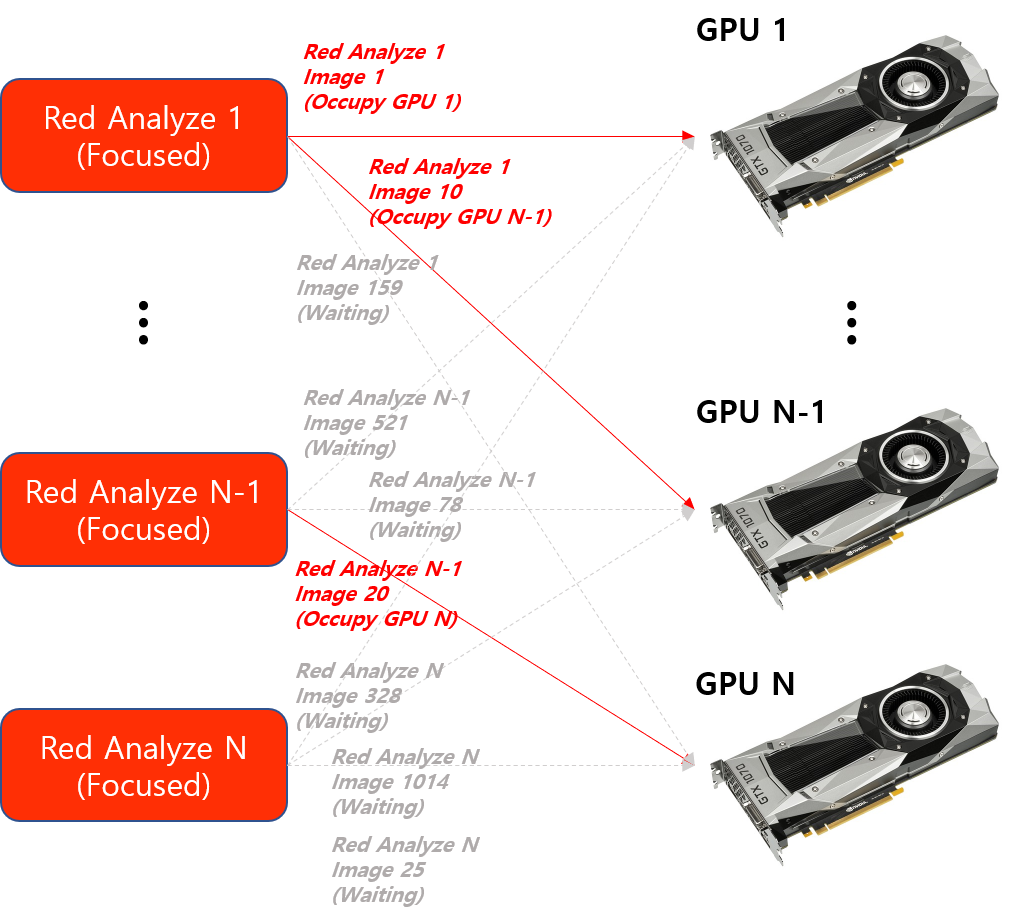
For processing a Legacy type tool, this means that all the images of this tool can be distributed on N GPUs (one image on one GPU, one at a time). If you have N Legacy type tools and N GPUs, it still works the same way so N GPUs are utilized in the way that each GPU takes an image at a time, not a tool.
For the processing of a Standard mode tool, this means that the images of this tool cannot be distributed on N GPUs and all the images of this tool can only be processed by one GPU (one tool on one GPU, one at a time). But, if you have N Standard mode tools and N GPUs, N GPUs can concurrently be utilized in the way that each takes a tool (all the images of a tool) at a time, not an image.
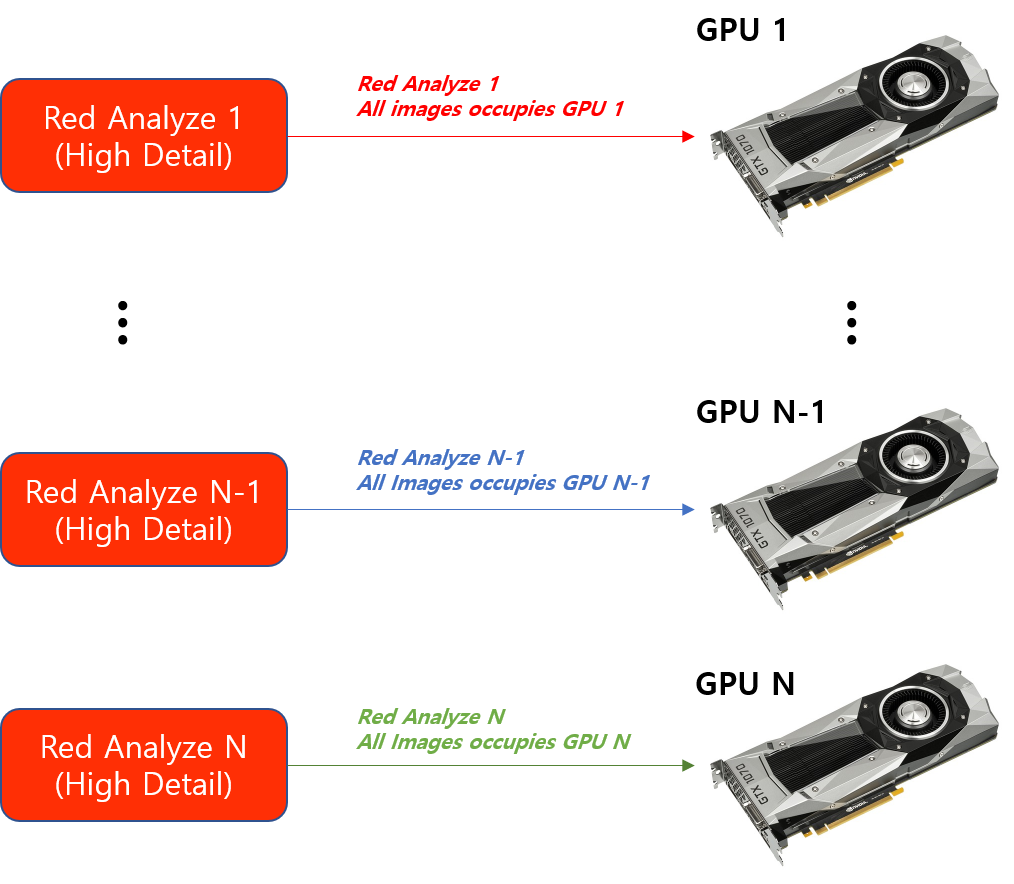
Again, for both Legacy and Standard type tools, the processing jobs in another Stream or another Workspace can be accessed by the multiple GPUs registered in your system and thus they can be executed simultaneously with multiple GPUs.