Install VisionPro Deep Learning
To install VisionPro Deep Learning:
-
Attach the Security Key to a USB port on the computer that you want to use to develop the vision application.
Note: The Security Key must remain connected to the computer during all phases of operation. For more information, see Software Security. -
Download the latest VisionPro Deep Learning installer from the Cognex support page.
-
Extract the contents of the .zip file.
-
Run the executable file in the extracted folder to start the VisionPro Deep Learning installer.
-
After accepting the license agreement, enter your user name and company name.
-
Select your installation type:
-
Complete: all VisionPro Deep Learning features are installed.
-
Custom: select the VisionPro Deep Learning features that you want to install.
-
-
Specify the install directory. The default directory is C:\Program Files\Cognex\VisionPro Deep Learning\4.1.
-
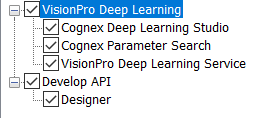
If you have selected a custom installation, you can uncheck the checkbox for any VisionPro Deep Learning components that you do not want to install.
-
Click Install at the final prompt and wait for the installation to complete.