Validation Loss
You can use the Loss The Loss refers to validation loss, which is a metric that shows how a tool performs on the validation set. Loss can have a value between 0 and 1. The VisionPro Deep Learning application calculates the Loss based on the errors the tool makes when processing the images in the validation set. During training, you can check the Loss in real-time using the Loss Inspector. to get a better understanding of how well a tool performs. Use the Loss score together with other metrics, like Precision, Recall, and the F-Score to evaluate results.
How to Interpret Loss
The VisionPro Deep Learning application calculates the Loss at the end of each epoch. An epoch is the time it takes for the tool to process the data from the training Training is the process that your tool, which is a neural network, is learning about the features (pixels) based on the labels you made. For example, a tool will learn the defect/normal pixels in each image based on the defect/normal labels you drew. The goal of the tool Training is learning enough to give the correct inspection results of whether an unseen image is defective or not. The key to training is to ensure that you include all possible variations within your training set, and that your images are accurately labeled. Training times vary by the application, tool setup and the GPU in the PC being used to train the network. set. Each training phase lasts several epochs. If the training session is effective, Loss decreases over the epochs.
When interpreting Loss scores, consider the following aspects:
-
Lower is better: a lower score means that the tool makes fewer errors on the validation set The validation set is a set of images reserved for validation. The validation set is separate from the training set and test set. Since the validation set is separate, it allows you to evaluate how well the tool performs when using unseen images. The VisionPro Deep Learning application calculates a special metric, the Loss. The Loss is based on the performance of the tool on the validation set..
-
Stability over time: Ideally, the score decreases and stabilizes over time. If the score varies between high and low, or increases, it means that the training session is not effective.
How to Interpret the Loss for Green Classify
The formula to calculate the Loss:
Loss = 1 - (The average value of the classification precisions of each class)
How to Interpret the Loss for Red Analyze
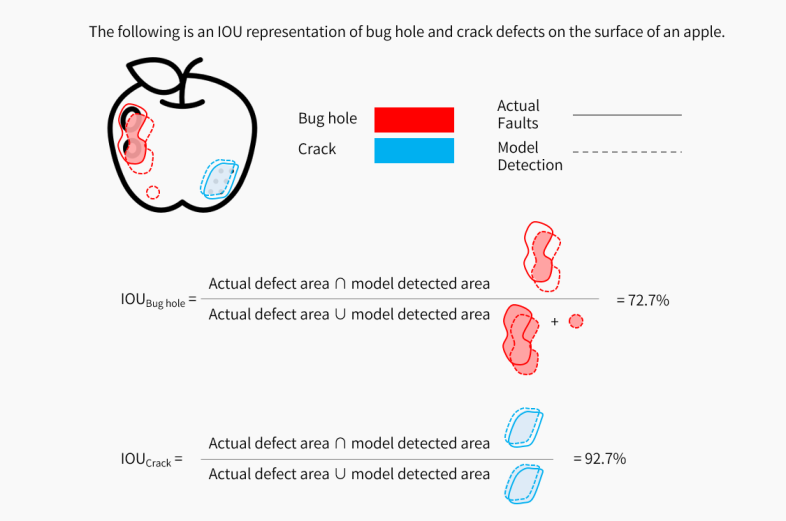
The application calculates the Loss for the Standard type Red Analyze tool based on the IOU The Intersection over Union (IOU) shows how much the predictions of the tool match your labeling. A higher IOU percentage indicates a better match..
The formula to calculate the IOU:
(Ground Truth Area ∩ Predicted Area) / (Ground Truth Area ∪ Predicted Area)
The formula to calculate the Loss:
Loss = 1 - (IOU (%))