Blue Read Tool – Regex Model
Regex models provide a flexible control for defining the exact format of the strings that you are interested in by allowing you to define the characters you want to find via a regular expression.
To use a regex model, do the following:
- After adding the tool, configuring the ROI and setting the character Feature Size, process the tool (press the Book icon).
-
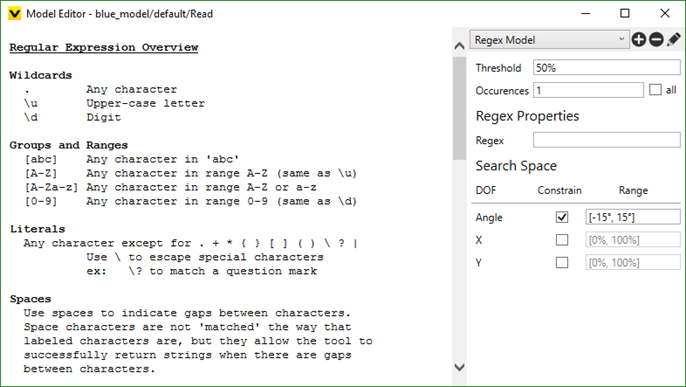
To create your regex model, from the Tool menu, select Edit Models, and from the Model Editor dialog, select Regex Model.
-
Define your regular expression in the Regex field.
Note:- When constructing your regular expression, the simplest wildcard is the period; it means "match any single character." You can then use modifiers after characters or wildcards to specify how many characters to match.
- The minimum match length for the regex model is three characters (not including the space character) or longer.
- The regex model will return the characters that match your regular expression within the ROI. The matched characters must lie along a single horizontal line, which is defined by using the Angle parameter, and is the allowable deviation from the horizontal axis of the ROI.
- Close the dialog by pressing the X button in the top-right corner of the dialog.
- The model will then be applied to the view that was open when the Model Editor was launched.
- Process the tool (press the Book icon) to apply the model to the rest of the views.
- Review the results. For more information, refer to the Working with Labels and Models topic.
Regex Model Score
For Blue Read tool, a model score (model match score) is a combination of two things:
-
The average score of the features in this model
-
The "geometry score" based on the geometrical arrangement of the features in this model
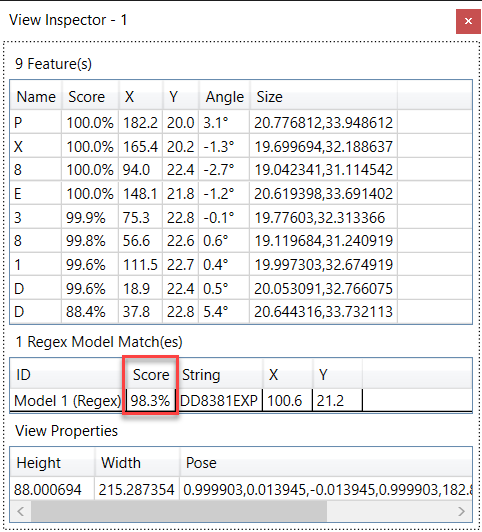
As the geometrical arrangement is included in the calculation of the overall model match score, the model score could be less than 100% even when all the features have a perfect score of 100%, given that the geometry score is less than 100%.
For the regex model, the "geometry score" is based on a combination of:
-
how close the feature positions are to lying on a single line
-
how equally the characters are spaced
For example, with a regex model, given 3 features of score 100%, the overall match score will be slightly less than 100% as the geometry score of this model is less than 100%. The geometry score will always be less than 100% unless all the features are exactly collinear and exactly equally spaced.