Neural Network Training
Neural network training is performed in the following general way:
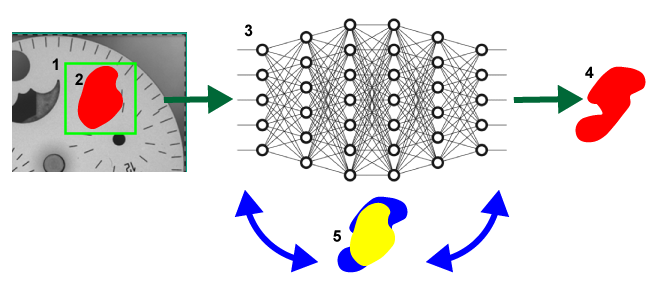
- Each image in the image set that is being used for training (defined in the Training Set dialog) is sampled across its full extent, using the specified Feature Size.
- The resulting samples are provided as input to the VisionPro Deep Learning deep neural network.
- For each sample, the neural network produces a specific response (depending on the tool type), and this response is compared with the image labeling associated with the sample's location in the training image.
- The internal weights within the network are repeatedly adjusted as the samples are processed and reprocessed. The network training system continually adjusts the network weights with a goal of reducing the error (difference or discrepancy) between the network's response and the labeling provided by the user.
- This overall process is repeated many times, until every sample from every training image has been included at least the number of times specified by he Epoch Count parameter.
|
|
|
|
1 |
The sampling region. |
|
2 |
The user-drawn, labeled defect region. |
|
3 |
The neural network. |
|
4 |
The response by the network. |
|
5 |
The iterative process of adjusting the weights to reduce the discrepancy (i.e. error) between the labeled defect (in yellow) and the network response (in blue). |
The specific characteristics of the neural network training vary somewhat depending on the type of tool being trained.
-
Blue Locate Tool Network Training
The Blue Locate tool network is trained to locate and identify features in an image. The Blue tool labeling that you perform identifies the locations and identities of all the features of interest in the image. For a given sampling region within the image, the goal of training is for the network to correctly return the pose of any features that lie within the sampling region. If a sampling region does not include any features, then the network should produce no response for that sample.
The goal for Blue Locate tool network training is to reduce the discrepancy between the actual feature pose and identity, as defined by your labeling of the image, and the detected pose and identity.
-
Blue Read Tool Network Training
The Blue Read tool uses the a similar approach to the Blue Locate tool, although less attention is paid to pose mismatch.
-
Red Analyze Tool (Supervised Mode) Network Training
The Red Analyze tool (in Red Supervised) network is trained to locate and identify defect regions within an image. The labeling that you perform for the Red Analyze tool in Supervised Mode labels all of the defect pixels in the labeled image. For a given sampling region within the image, the goal of training is for the network to correctly identify the defect pixels as defects. If a sampling region does not include any defect pixels, then the network should produce no response.
The goal for network training of the Red Analyze tool in Supervised Mode is to reduce the spatial discrepancy between the defect labeling and the detected defects.
-
Red Analyze Tool (Unsupervised Mode) Network Training
The Red Analyze tool (in Unsupervised) network is trained to locate defect regions within an image. The training image set for the Red Analyze tool in Unsupervised Mode is simply a collection of known defect-free images. The goal for training is simple – to produce a network that generates no response to any sample from the training image set.
-
Green Classify Tool Network Training
The Green Classify tool is unique among the Deep Learning tools in that it produces a single result for the entire input image. There are High Detail mode and Focused mode. The tool still collects image samples in the same way as the other tools, but the samples are pooled during processing and a single result for the entire image is produced.
The goal for the Green Classify tool network training is to reduce the number of mismatches between labeled and detected classes.
-
Controlling Network Training
The largest single determinant that you can use to affect the network training phase is the composition of the training image set. The default behavior for all tools is to train using 50% of the images in the image set, with the images selected at random.