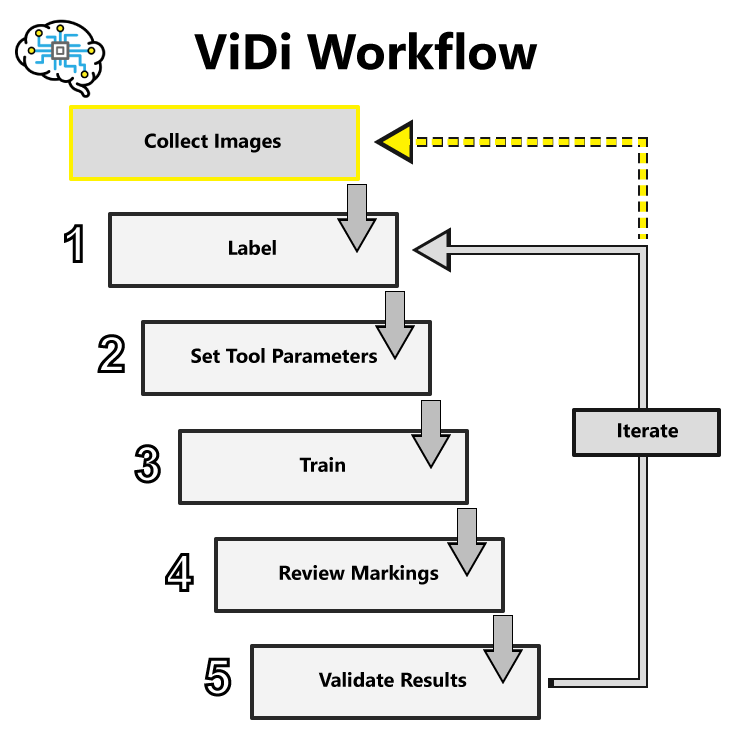
VisionPro Deep Learning Workflow
-
Collect Images
Follow the best practices for image quality in standard machine vision applications, where contrast is key.
Within the image, defects and features must be human-distinguishable.
Control all possible variables, such as consistent lighting, working distance, camera trigger timing, etc.
-
Label
This establishes the ground-truth for your tools, what is good or bad, what is a feature of interest, what a character is, what type of thing is in the image.
It is important that you label all the views, and labeling must be accurate.
Note: For more information, refer to the Labeling topic. -
Set Tool Parameters
The Deep Learning tool parameters adjust how the network trains and processes images.
The most common tool parameters to adjust are the following:
- Feature Size/Patch Size
- Training Set
- Perturbation parameters
- Sampling Density
Typically, the default settings of the parameters perform well against most image sets. Try training without adjusting any parameters beside Feature Size first.
Note: For more information about the tool parameters, refer to the VisionPro Deep Learning Tool Parameters topics. -
Train
The key to training is to ensure that you include all possible variations within your training set, and that your images are accurately labeled.
Training times vary by the application, tool setup and the GPU in the PC being used to train the network.
-
Review Markings
Markings represent Deep Learning's results for each image, and have unique graphic representations for each tool.
Labels are generated by the developer. Markings are generated by Deep Learning.
-
Validate Results
Additional tool results are presented in the Database Overview panel. For each tool this includes the tool's processing time, scores and other statistical analysis.
Note: For more information, refer to the Statistics topics.