Wafer Pre-Align Tool Results
For each image that you supply to the Wafer Pre-Align tool, the tool attempts to locate a single instance of the model wafer within the image. For each image, the tool returns the following results:
- Whether the wafer was found
- Whether the specified alignment feature was found
- The type of alignment feature that was found
- The size of the wafer, expressed as the scale between the model wafer and the found wafer
- The dimensions of the alignment feature, if one was found
- The location and orientation of the wafer, and the location of the alignment feature (if one was found)
The feature dimensions are described in the section Locating The Trained Wafer.
The wafer location is considered to be the location of the wafer center. The feature location is the deepest point of the notch (for notched wafers) or the center of the flat (for flat wafers). The wafer’s orientation is the angle from the client-coordinate system x-axis to a line drawn from the wafer center through the feature location. Foreshortening causes elliptical-appearing wafers shows how these measures are returned.
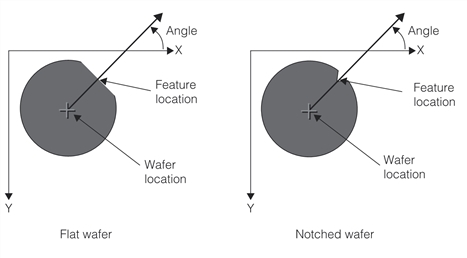
Wafer angle and location and feature location