Training the Line Scan Distortion Correction Tool Using an Image
When the tool is trained from an image, the line scan image should be in free running mode and the camera and the scene should be stationary so that the acquired image looks like a series of vertical stripes.
You must train the tool using a training target that meets the following requirements:
- The training target must be large enough to fill the entire field of view of your camera when it is placed at the working distance used by your application.
Otherwise, the tool may perform suboptimally in the case where the training region is smaller than the run-time region because the tool will extrapolate the distortion for the uncovered portions of the training image. - The surface of the target must have a series of alternating, equally sized white and black regions where:
- The difference in grey levels in an image of the target must exceed 10.
- The regions should be sized so that at least 30 sets of black and white regions are visible across the camera's field of view.
- The black and white regions must be of equal width.
- In the acquired image of the target, each black and white region must be at least 10 pixels wide.
- The boundaries between the black and white regions must be parallel.
- The training target must be constructed so that it can be rigidly mounted at the working distance of your application such that the points defined by the intersection of a line normal to the direction of travel with the boundaries between dark and light regions are collinear; the target must be flat in the x-direction.
The following figure shows a valid training target.
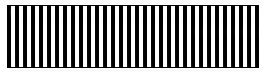
Valid training target
To train the Line Scan Distortion Correction tool, perform the following steps:
-
Mount your camera in the location where it will be used at run time. Adjust your focus, lighting, and aperture to meet the requirements of your application.
Note: You must not change the physical or optical characteristics of the camera after training. - Place the training target such that the camera field of view is filled by the target, the boundaries between the black and white regions are parallel to the direction of travel, and the surface of the target is at the same height as the parts or surface being inspected.
The following figure shows the positioning of a valid training target. -
Without moving the target, acquire an image with at least 50 scan lines. The acquired image should appear to contain a series of alternating dark and light stripes.
Note: For information on acquiring an image for training, see the section about acquiring with line scan cameras in the CVL User’s Guide. - Call the train() function of the tool.
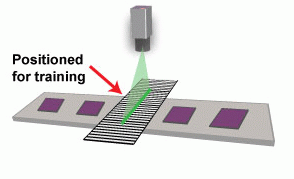
Positioning of a valid training target
The following figure provides an overview of the training image acquisition process:
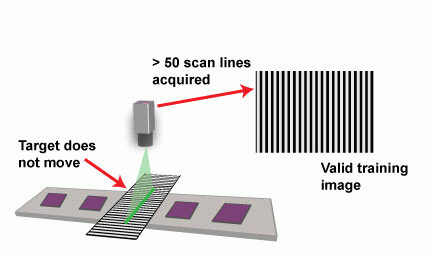
Overview of the training image acquisition process