Setting the Acceptance and Confusion Thresholds
The acceptance and confusion thresholds are score values that control whether an image area matches or fails to match the model. The acceptance threshold defines the lowest score for a valid match. Image areas with scores below the acceptance value are not matches, so the Symbol tool rejects them as potential symbols.
The confusion threshold defines the highest score for an invalid match. Areas with scores above the confusion value are matches, and the Symbol tool immediately accepts them as potential symbol locations.
As shown in Acceptance and confusions thresholds, 2D symbols, scores between the two thresholds might or might not match the model.
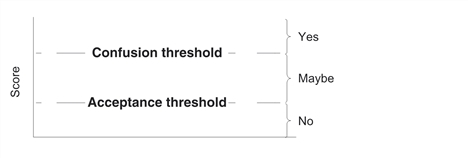
Acceptance and confusions thresholds, 2D symbols
The valid range for both thresholds differs in CVL and OMI. For CVL it is from 0.0 to 1.0. For OMI it is 20 to 99. The defaults are appropriate for most applications and rarely require adjustment. If you do change the values, always set the confusion value above the acceptance value. For information about the defaults for these parameters, see the section Framework Differences.