Pixel Mapping
Certain kinds of scenes cannot be segmented using any kind of binary threshold technique. Binary thresholding only works when all parts of the blob are brighter (or darker) than all parts of the background area. In cases where the blob contains holes and the holes are not the same shade as the rest of the background, binary thresholding always fails.
The figure below shows an example of an image where thresholding does not produce the desired result. The image shows a dark part on a light background. Because of poor lighting conditions, the two holes within the part have a pixel value that is less than the pixel values for the part. Any threshold that assigns the pixels that make up the part as object pixels will also assign the pixels that make up the holes within the part as object pixels. Alternatively, a threshold that assigns the pixels that make up the object to a different segment from the pixels that make up the holes within the part will assign the pixels that make up the part as background pixels. The figure below shows the results of both types of threshold segmentation on the image.
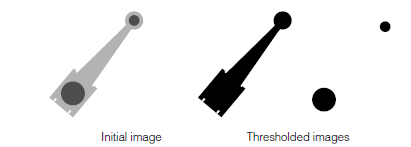
Image that cannot be segmented by thresholding
You can segment images such as that shown in the figure above using a pixel map. A pixel map lets you specify exactly which ranges of pixel values will be assigned as object pixels (pixel weight of 1), which ranges of pixel values will be assigned as background pixels (pixel weight of 0), and which ranges of pixel values will be assigned as edge pixels (pixel weight between 0 and 1). The pixel map is a simple look-up table that defines the pixel weight to assign for each pixel value.
The figure below shows an example of a pixel map that might be used to segment the image shown in the figure above.
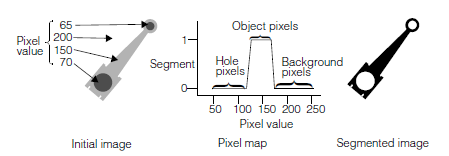
Segmenting an image with a pixel map