Output Image Size
Unless the structuring element is 1x1 (that is, a single‑pixel structuring element), the destination image will lose pixels from its outer borders. When a structuring element operates on pixels on the outer border of an image, some of its pixels are outside the image. Operations on such border pixels yield invalid regions in the destination image. The Grey-scale Morphology tool produces destination images that are smaller than the input images that you supply.
In a single morphological operation, the number of rows or columns of pixels lost on each side of the source image is equal to the number of rows or columns of pixels on the corresponding side of the reflected structuring element’s origin (that is, not counting the origin).
For example, the invalid region for a single morphological operation (erosion or dilation) with a 3x3 structuring element whose origin is the center pixel is 1 pixel on all sides; this region is illustrated in the top figure below. The invalid region for a 4x4 structuring element whose origin is (2,2) is 1 pixel on the left edge, 2 pixels on the right edge, 1 pixel on the top edge, and 2 pixels on the bottom edge; this region is illustrated in the bottom figure below (note that the reflected origin is shown).
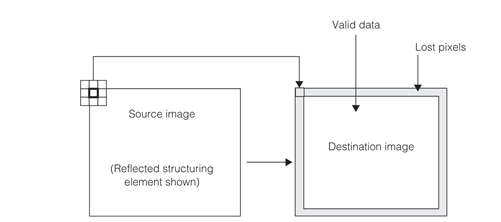
Lost pixels for a single operation with a 3x3 structuring element with origin at center
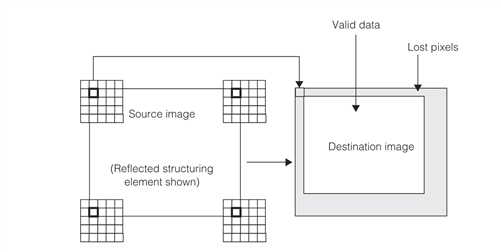
Lost pixels for a single operation with a 5x5 structuring element with origin at (1,1)
When you perform a compound operation such as opening or closing, you lose the above‑specified amount of pixels twice, once for each operation. For example, the indeterminate data region for an opening or closing using a 5x5 structuring element whose origin is (1,1) would be 2 pixels on the left and top edges, and 6 pixels on the right and bottom edges.