Masking
The Variable-Size Kernel tools support two types of masking. You can associate a mask image with the kernel and you can associate a mask image with the input image. For both types of masks, a pixel value of 0 means ‘don’t care’ while a pixel value of 255 means ‘care’.
When the tool applies masked kernel to an input image, only pixels in the input image that correspond to care pixels in the kernel are used to compute the output image pixel value. When the tool is run using a masked input image, only pixels in the input image that correspond to care pixels in the input image mask are used to compute the output image pixel value. If a mask is supplied for both the kernel and the input image, then both the kernel pixel and the input image pixel must be care pixels for the tool to use that pixel.
The figure below summarizes the masking behavior.
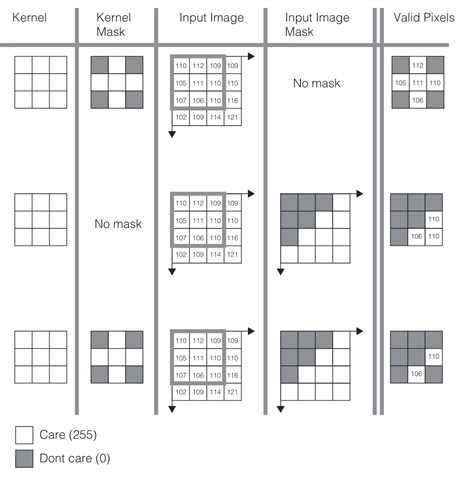
In all cases, both kernel and input image masks must have the same size and image offset as the kernel and input image, respectively.