Image Warp Tool Overview
All images contain some distortion caused by tolerances in the acquisition system electronics, and imperfections in camera lenses. In many applications the distortion does not affect the operation of vision tools, but for applications requiring high accuracy or applications with high distortion, it must be corrected to achieve the desired results.
The most common way to correct distortion is to build the correction into the client coordinate calibration transform. Using this method, vision tools work on the distorted image, but when results are transformed to real world units, the distortion correction is applied. See the figure below.
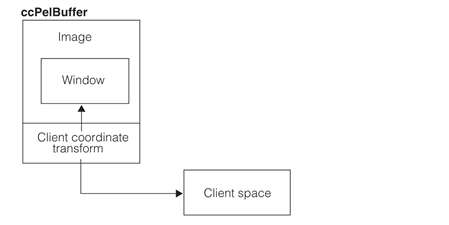
For these applications the client coordinate transform can be linear (cc2XformLinear) or nonlinear (cc2XformPoly). These calibration transforms are discussed in Calibration Tools and the Images and Coordinates chapter of the CVL User’s Guide.
Although this method works well in many cases, the vision tool algorithms are applied to a distorted image. A better solution is to create a tool that builds a distortion correction map, and then transforms distorted images into corrected images for vision tools to use. This is the purpose of the Image Warp tool. See the figure below.
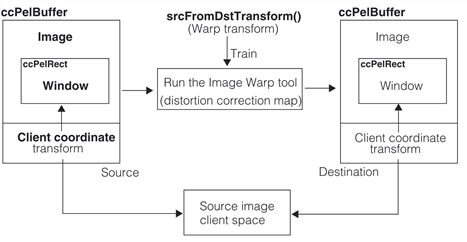
To use the Image Warp tool it must be trained with a warp transform and other information about the source pel buffer and the destination pel buffer. The warp transform can be created from calibration plate images and tools provided with CVL, or you can provide your own warp transform. During training the tool builds a pixel map from the source image to the destination image and also creates the destination client coordinate transform that transforms warped destination image coordinates to the correct client coordinates.
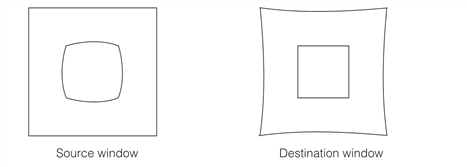
Once the tool is trained you run it on distorted images to correct the images, and then these corrected images can be used with other CVL tools such as Blob and Caliper to produce more accurate results. The figure below shows an example of a distorted image of a square, and its corrected image.