Filter Size
You should specify a filter size that closely matches the size of the edges in your input images. The size of an edge is the number of pixels wide that the edge is. Edges can be sharp, in which case the edge only spans one or two pixels, or edges can be dull, in which case they might span many pixels. The figure below illustrates examples of sharp and dull edges; the figure illustrates both types of edges at different magnifications.
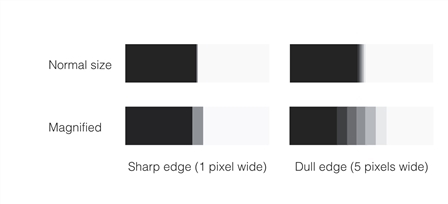
When you specify a filter size that is close to or greater than the edge size, the Caliper tool produces stronger edge peaks in the filter image. If you specify a filter size that is too small, the filter image will contain broad, low peaks. The figure below illustrates the effect of applying filters of different sizes to sharp and dull edges.
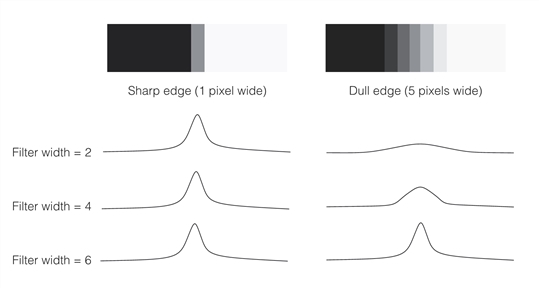
The effect of filter size and edge size on peak size
The figure above illustrates that if you select a filter size that matches or that is greater than the size of the edges of interest within the image, the desired peaks in the filtered image will be sharper and there will be fewer spurious peaks.
If you have multiple edges within the projection region and you select a filter size that is large enough to include a neighboring edge, the included pixel values of the neighboring edge will cause the degradation of the current edge’s peak in the filter image. Therefore, make sure you specify a filter size that does not include neighboring edges that are expected to appear in the input image. In other words, the upper limit of the filter size is determined by the minimum expected distance between edges in the input image.