Character Verification
To verify a single character key in any character string, the OCVMax tool performs the following steps:
- The tool generates a matching score comparing the expected character key to the character key being verified. See section Matching Scores and Accept Thresholds for more information. The matching score must exceed an accept threshold in order to continue verification. If the matching score falls below the accept threshold, the character key fails verification immediately.
- Using the confusion matrix, the OCVMax tool compares the matching score against the matching scores generated for all potentially confusing character keys. See section Confusion Scores and Confusion Thresholds for more information. If there are no confusion scores higher than the confusion threshold, the character key passes verification immediately.
- The tool subtracts the highest potentially confusing score from the matching score, and compares that resulting value against the confidence threshold.If the value is greater than or equal to the confidence threshold, the character key passes verification; otherwise, the tool reports the character key being identified is currently confused with another character key.
The verification process can be described graphically with the following flowchart:
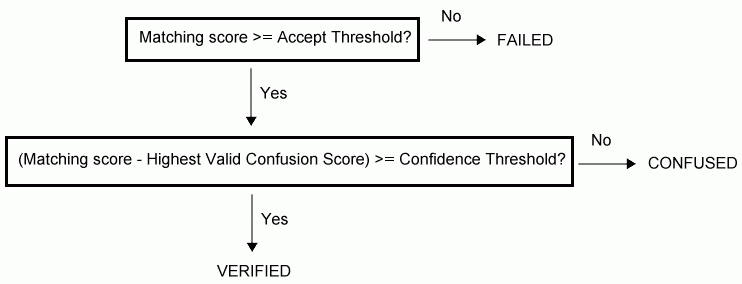
Verification process flowchart
You use the ccOCVMaxLineResult, ccOCVMaxParagraphResult, ccOCVMaxPositionResult, and ccOCVMaxResult objects to obtain verification results. You can also use the ccOCVMaxPositionResultStats, ccOCVMaxResultDOFStats, and ccOCVMaxResultStats objects to accumulate statistics over sets of results; such statistics can be helpful for setting DOF ranges and score thresholds or for process control.