Calibration Plate Images
Features extracted from calibration plate images are used to create a cc2XformCalib2 transform. You can create a calibration transform using a single image but your accuracy will improve if you use multiple images. When you use a single image you cannot compute the intrinsic and extrinsic parameters from the calibration object. The object is however, still useful for correcting distortion in images; for example, with the Image Warp tool. (See Image Warp Tool).
When you use multiple views, the calibration transform computes intrinsic and extrinsic parameters, and accuracy improves. Adding more views increases the accuracy.
Your choice of images will also affect the transform accuracy.
Multiple views of a calibration plate must satisfy the following important restriction:
The planes of the calibration plate relative to the camera cannot be parallel in any two views.
Example camera setup for calibration plate images shows an example of a calibration using five views.
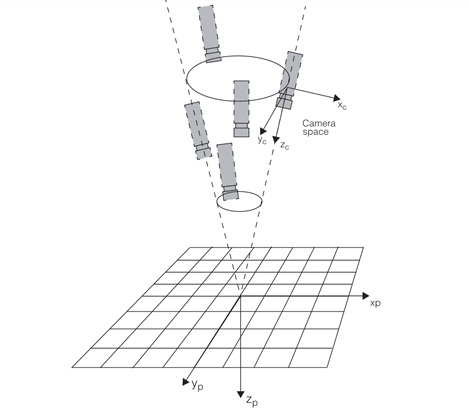
Example camera setup for calibration plate images
Obviously, the same images can be captured using a stationary camera by changing the position and orientation of the calibration plate relative to a fixed camera.