Overview of Image Acquisition
Regardless of the image acquisition hardware base, CVL uses a common image acquisition algorithm. Understanding how CVL acquires images is an important part of understanding how to use the acquisition API to obtain the best acquisition performance. The figure below provides an overview of how an acquired image is moved from a camera to a frame grabber, and then to a pel buffer in system memory.
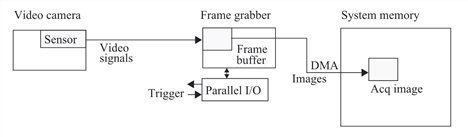
Acquiring an image, frame grabber example
An image is captured by the sensor of a video camera. Each sensor pixel stores an analog voltage proportional to the light falling on the sensor at that location. Most cameras transmit the sensor array pixel-by-pixel serially as an analog signal in a raster scan format to a Cognex-supported frame grabber. When an image is completely acquired in the frame buffer, the image is transferred to a pel buffer in system memory through the processor DMA channel. Once you setup the acquisition, from the time an acquisition is started until the image is in system memory no intervention is required from your application program.
Digital cameras perform the analog-to-digital conversion inside the camera and output a digital signal that can be sent directly to system memory through an adapter. This method is described by the GigE specification. The figure below shows a GigE configuration.
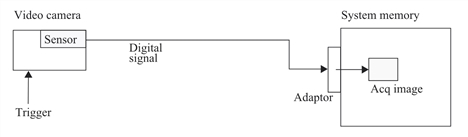
Acquiring an image, GigE example
To acquire images as described above, you must create a FIFO object in your program. For example, you create an object of type ccAcqFifo. You configure the FIFO for the camera and format you are using and acquire images by calling its start() method. You also call the FIFO completeAcq() method to initiate processing the acquired image. start() and completeAcq() should always be issued in pairs, one pair for each acquired image. Multiple starts can be queued within the FIFO. Only one FIFO is required to process a stream of acquisitions from the same camera. For a multiple camera application you will generally create one FIFO for each camera.
A queued start() invokes an acquisition engine thread that manages image acquisition. Each acquisition FIFO is associated with its own engine thread and each engine thread executes the following steps for each acquisition:
ACQ0: Wait for engine queue requests
ACQ1: Gain access to hardware.
ACQ2: Set up hardware for next acquisition.
ACQ3: Wait for trigger (hardware trigger only) and acquire image.
ACQ4: Release hardware for use by other FIFOs.
The figure below is a simplified model of the image acquisition engine subsystem.
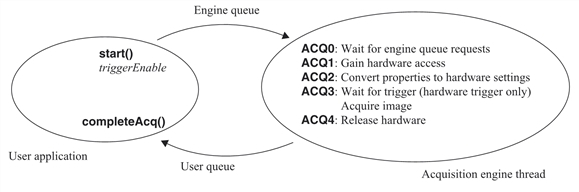
Each FIFO contains two internal queues, the engine queue and the user queue. The engine queue contains acquisition requests for which images have not been acquired. The user queue contains acquisition requests for which image acquisition is completed, but the completeAcq() method has not been called.
The following paragraphs provide a short description of each engine thread state.
ACQ0
Requests in this state are ready for acquisition and are held in the engine queue. In manual trigger mode and semiautomatic trigger mode, triggerEnable plus start() places a request in the engine queue. In automatic trigger mode, triggerEnable alone places the request in the engine queue.
ACQ1
In this state, the request waits to gain exclusive control of non-shared hardware resources in the frame grabber. If the current FIFO request uses the same resources as the previous request, no hardware allocation wait is required. If the current FIFO request uses different resources, it will block in ACQ1 waiting for the previous request to clear from the FIFO engine so that it can take control of the frame grabber hardware resources. This hardware allocation state allows acquisition hardware to be shared among multiple acquisition FIFOs.
ACQ2
In this state, the FIFO converts properties into hardware settings. The time required to perform this step depends greatly on the previous state of the hardware. The first acquisition is typically the worst case, where the FIFO must wait for the camera and frame grabber hardware to synchronize video timing. If the timing is already synchronized, and there were no property changes since the last acquisition, ACQ2 can take very little time.
ACQ3
In this state, the image is actually acquired. For manual triggers, acquisition begins immediately. For auto and semi auto triggers, the thread waits for an external trigger signal to begin the acquisition.
If external triggering is used, and a trigger occurs before the FIFO is ready to transition to ACQ3, an error is generated.
ACQ4
After the acquisition is completed, ACQ4 releases the FIFO’s claim to the hardware, allowing the hardware to be used by other FIFOs. For performance reasons, the FIFO may elect not to release the hardware during ACQ4. This speeds up ACQ1, but more importantly precludes other FIFOs from claiming or making changes to hardware that would slow down ACQ2.