Color Format Conversion
Color mapping is the process of format conversion. For example, when you display an 8-bit image on a 16-bit desktop, the 8-bit colors must be converted to 16-bit colors. The conversion is done using the format conversion table or color map.
The format conversion table used on 8-bit desktops is built into the hardware and is also referred to as the hardware palette. It always has 256 values, the top 10 and bottom 15 of which are non-alterable (with the exception of indices 8, 9, 246, and 257, which can be altered by the operating system).
Non-8-bit desktops maintain two color maps, one for graphics and one for images. Both are used as software conversion tables. The software-based conversion table used for images is referred to as the color map. It too has 256 values, all of which can be set to any RGB value.
On an 8-bit desktop, each RGB value is packed into three bytes of storage space. On a 16-bit desktop, each RGB value is packed into one 16-bit word. On a 32-bit desktop, each RGB value is packed into one 32-bit double word.
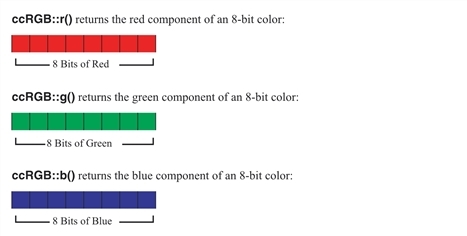
Internal representation of an 8-bit color
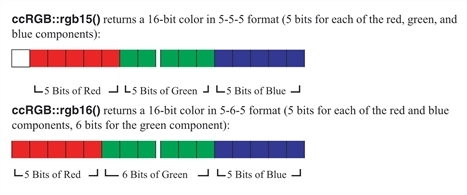
Internal representation of a 16-bit color
The figure above shows the internal representation of a 16-bit color and the figure below shows the internal representation of a 32-bit color:
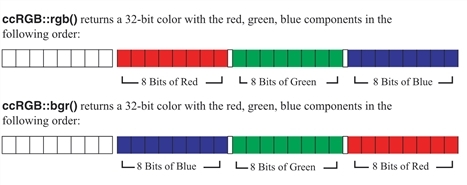
Internal representation of a 32-bit color
When converting between 8-bit and 32-bit colors, the mapping is straightforward. However, when converting between 16-bit and the other two formats, approximations must be made. Since the red, green, or blue component can only be represented with 5 or 6 bits on a 16-bit desktop, the system must approximate the 8-bit representation of that component.