Using the PatMax Composite Model Manager
PatMax composite model training starts with a standard PatMax pattern that you train using the “best” part image that you can obtain. You then use the ccPMCompositeModelManager object to manage, create, and train Composite Models for PatMax, starting with your standard PatMax pattern.
The figure below provides an overview of how you use the Composite Model Manager.
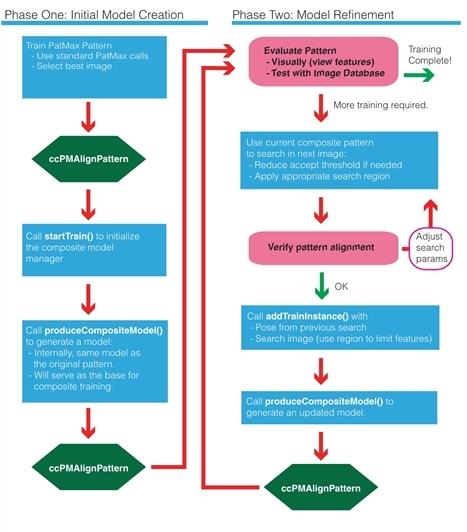
Recommended workflow with Composite Model PatMax
You begin Composite Model creation by calling ccPMCompositeModelManager::startTrain() supplying an initial trained single PatMax model to it. This model is used as the first train instance, and many of its settings are carried over to the Composite Model. This includes the granularities, which algorithms are trained, and the definition of the model coordinate space. Next, you add fixtured model instances to the ccPMCompositeModelManager object using ccPMCompositeModelManager::addTrainInstance() (or ccPMCompositeModelManager::addTrainInstances() if you are adding multiple model instances). You supply to ccPMCompositeModelManager::addTrainInstance() an input training image paired with a modelFromClient “pose” transform that tells where the model is found in that image. At any time after ccPMCompositeModelManager::startTrain() has been called, the manager can produce a Composite Model based on all added train instances by a call to ccPMCompositeModelManager::produceCompositeModel().
You may repeat this process as often as desired, adding a new instance and requesting a new Composite Model.
There are a number of parameters to guide the process of creating a Composite Model, which are specified in the ccPMCompositeModelParams object.