Image Stitching Tool Overview
The Image Stitching tool combines two or more source images into one composite result image. The tool is useful when a camera field-of-view (FOV) is too small to capture an entire scene and multiple images are required. The tool can stitch together these images into a single image of the entire scene which can then be used by other vision tools. The figure below shows an example of a large-leaded SMD device captured in four images. Using the Image Stitching tool you can stitch these four images together to make a single result image of the entire device.
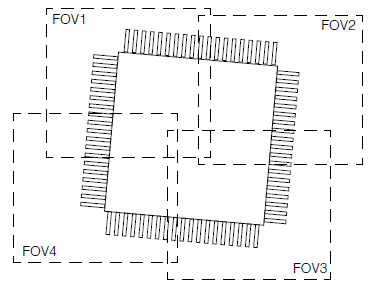
Example scene captured with four images
The source images can be provided by a single moving camera, by multiple fixed cameras, or by most any camera setup where each camera captures part of the same scene. Cameras need not be the same type or size but all cameras must be calibrated so that the client coordinate transform associated with each image targets a common client coordinate space.
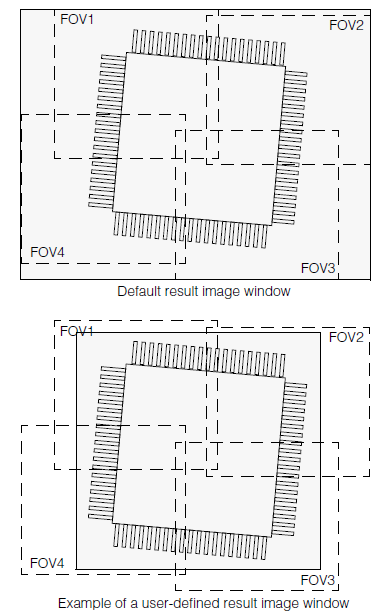
The Image Stitching tool allows you to specify the result image window, or you can allow the tool to specify a default result window as the bounding box that encloses all of the source FOVs. Result image window examples shows the default result image window (shaded area) for the example in the figure above, and also an example of a user-defined result window.