How the Image Warp Tool Works
To use the Image Warp tool you must train it with a warp transform and other information about the source and destination pel buffers. You can use your own warp transform (eGeneral mode), or you can create a warp transform using CVL tools (eUsingCalibration mode). The warp transform you create with CVL tools can be created from intrinsic and extrinsic parameters, or from images of a calibration plate. The figure below shows an overview of the training options.
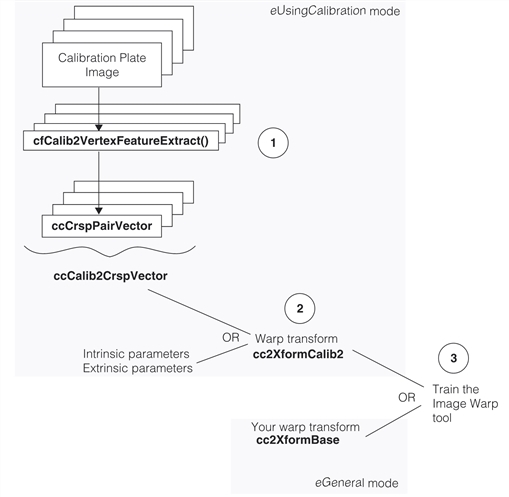
The tool has a flexible API and can be trained in one of three ways. You can train it with a warp transform that you create yourself; this is called eGeneral mode and allows you to correct images using a variety of correction transforms. The eUsingCalibration mode accepts a calibration transform object created from the CVL class cc2XformCalib2. This transform can be created either from your system parameters or from calibration plate images. When you create a calibration object from images you must first extract feature points from the images and couple them with corresponding physical locations. When you use CVL tools, the global function cfCalib2VertexFeatureExtract() does this corresponding for you.
Two support tools were developed along with the Image Warp tool and the three parts are labeled 1, 2, and 3 in the figure above. The following is a brief description of each part;
- The new global function cfCalib2VertexFeatureExtract().
- The new calibration transform object, cc2XformCalib2.
- The Image Warp tool.
This function analyzes an image of a checkerboard calibration plate and finds features (rectangle corners) and builds a correspondence table of feature locations in the image and feature locations in physical space.
This new nonlinear calibration object was specifically designed to accept vectors of feature correspondences from the cfCalib2VertexFeatureExtract() global function, and to be used as a warp transform for the Image Warp tool. Note that since the cfCalib2VertexFeatureExtract() feature corresponder is separate from the calibration object, the option is open for other corresponders to be written. For example, a corresponder could be written for images of a grid-of-dots calibration plate and the corresponder output used to create cc2XformCalib2 objects.
Note also that cc2XformCalib2 objects can be very accurate nonlinear transforms you may wish to use with other CVL tools besides the Image Warp tool. Creating cc2XformCalib2 calibration objects is discussed in Feature Correspondence Calibration.
The Image Warp tool was designed to be trained with a cc2XformCalib2 warp transform. However, in eGeneral mode you can train the tool with any linear or nonlinear transform derived from cc2XformBase. This leaves the door open for designers with special requirements to train the tool using a wide variety of warp transforms.
Once the tool is trained, you can run it repeatedly by calling warp().