Degrees of Freedom
The appearance of characters can change in a variety of ways from one image to the next. Each of these types of transformation is called a degree of freedom, and can be characterized by a single numeric value, such as the amount of rotation a character undergoes from one image to the next. See examples for transformations in the table below.
|
Degree of Freedom |
Example |
|
X Shift |
|
|
Y Shift |
|
|
Angle |
|
|
Uniform Scale |
|
|
Scale X |
|
|
Scale Y |
|
|
Shear |
|
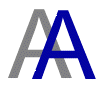


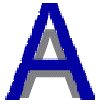



Usually, changes in degrees of freedom affect the entire character string, not individual character keys. For example, the figure below shows an entire character string and a transformed version of it that has undergone a change both in Angle (D = 6 degrees) and Uniform Scale (D =1.15).
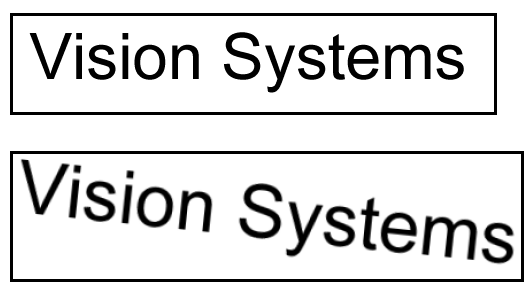
An entire character string that has undergone both a change in Angle and Uniform Scale
Depending on your print equipment or surface material, however, your character string can manifest a particular degree of freedom on a character-to-character basis. For example, the following figure shows a character string where each subsequent character key in the string suffers a decrease in uniform scale:
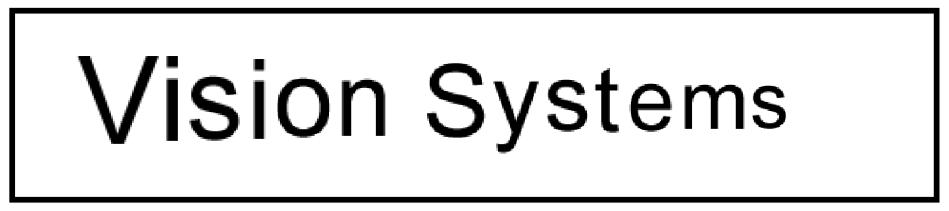
Subsequent decrease in uniform scale
For character strings such as this, the OCVMax tool must know about the change in uniform scale on a character-to-character basis.
As you tune an OCVMax tool, you must acquire a training image of the character string(s) you want to verify, and then create examples of each string using character keys from a matching font file. Using this training image and rendered character strings, an OCVMax tool can use its tuning feature to automatically detect which degrees of freedom you should enable for initial testing against the images you acquire later.
The tuning feature uses PatMax technology to test a wide range of values for each degree of freedom to determine the best match between the character string you want to verify and the underlying example image. See the section Training and Tuning for more information on OCVMax tuning.
Once the tuning process completes, the OCVMax tool will have a set of parameters that should provide a good basis for the final set of parameters you will use when you deploy your application. As you test the OCVMax tool on different sample images, the OCVMax tool can make additional recommendations for modifying the range for various degrees of freedom, as well as hints for other search parameters. Be aware, however, that the OCVMax tool will not make recommendations for any degrees of freedom you disable.
You can enable or disable degrees of freedom using the following functions:
ccOCVMaxSearchRunParams::zoneEnable()
ccOCVMaxTrainParams::zoneEnable()
Although you can disable the tuning feature of an OCVMax tool and set which degrees of freedom you want the tool to consider, this can cause the tool to require a great deal of time to determine which settings provide the best results. Cognex recommends you use the tuning feature of an OCVMax tool to generate the best set of parameters as you move toward testing the tool on various sample images.
In general, the number of degrees of freedom you enable increases the amount of time the OCVMax tool requires to sufficiently analyze an image and perform verification. Disabling additional degrees of freedom should improve performance time, at the risk of failing to verify particular character keys because of the degrees of freedom they might exhibit.
Be aware that simply enabling a degree of freedom does not improve the ability of an OCVMax tool to reliably verify a character key in successive run-time images. As the OCVMax tool attempts to verify a particular character key in a string, the degrees of freedom currently enabled determine the overall strength of the match. For example, the same character key can be perceived to be a better match with the Uniform Scale degree of freedom disabled rather than enabled.
This is especially true when a particular degree of freedom is enabled but the found character key exhibits a transformation outside the current range. For any enabled degree of freedom, the set range must encompass the variety of transformations a character key can undergo in order to prevent that degree of freedom from having a negative impact on the ability of the OCVMax tool to verify that character key.