Character Model Image Guidelines
The figure below shows an example of a character model. For best results, you should observe the guidelines listed in this section when you select an image to create a character model.
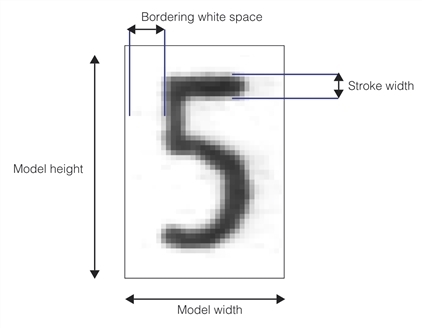
- The image should be representative of a typical run-time character.
- The size of the character model image should be at least 10x10 pixels. Character model images larger than 64x64 pixels may cause the tool to operate more slowly.
- The stroke width of the character in the image should not vary by more than 10%.
- No more than 10% of the character should be missing. If you are attempting to create a font of dot-matrix characters, you should use an image processing tool to fill in the character stroke for both character model and run-time images.
- The character model image should contain a border of white space around the character that is between one and three times the stroke width.