Setting FIFO Properties

Set FIFO properties by first obtaining a handle to a properties object using the ccAcqFifo::properties() method, and then calling the setter for that property. For example:

fifo->properties().cameraPort(0);
fifo->properties().exposure(20e-3);
fifo->properties().contrastBrightness(0.5, 0.5);

The first line selects the frame grabber port where the camera is connected that will be used to acquire images. Port numbers are numbered sequentially starting with 0.

The second line sets the camera exposure time to 20 msec.

The third line sets the frame grabber contrast and brightness. This controls how light values are mapped to pixel values as the image passes through the frame grabber.

Each property class defines pairs of member functions that let you set or get its values. Some properties, such as the trigger property, define additional member functions that let you specify finer aspects of the property.

The table below provides a description of each of the acquisition FIFO property classes.

Acquisition property classes

Property Class

Description

cc8BitInputLutProp

Lets you specify a lookup table (LUT) that maps raw input pixel values to your own 8-bit values.

ccCameraPortProp

Controls which camera port the acquisition FIFO takes images from. Port numbering is zero-based.

ccCompleteCallbackProp

Allows you to register a function that will be called when the acquisition is completed. See also ccAcqFifo::completeInfoCallback().

ccContrastBrightnessProp

Controls the contrast and brightness of analog cameras.

ccCustomProp

Allows you to create a collection of custom property-value pairs and custom commands. These custom commands are applied to the acquisition device before each acquisition.

This class is supported for GigE and Imaging Device Adapter acquisition.

ccDigitalCameraControlProp

Allows you to control properties of digital cameras.

ccEncoderControlProp

Provides functions to control and match the specifications of a hardware position encoder connected to CVM11.

ccEncoderProp

Controls frame grabber-specific devices for interfacing to an external position encoder on CVM11.

ccExposureProp

Sets the shutter speed for shuttered cameras. For strobed applications, informs the acquisition system about the duration of the strobe flash. The default value is appropriate for strobing, and may need to change when using ambient lighting.

ccFirstPelOffsetProp

Allows you to specify the offset of the first image pixel from the value supplied by the camera’s device driver. This property is used with platforms that support line scan cameras.

ccGigEVisionTransportProp

Allows you to control the transport-related properties for GigE Vision cameras.

ccMovePartCallbackProp

Allows you to register a function that will be called when the image has been integrated but before the acquisition is complete. See also ccAcqFifo::movePartInfoCallback().

ccOverrunCallbackProp

Allows you to register a function that will be called if the acquisition failed because it was unable to start the acquisition in a timely fashion even though the acquisition system was able to obtain the required resources. See also ccAcqFifo::overrunInfoCallback().

ccPelRootPoolProp

Allows you to specify how root image buffers are allocated.

ccRoiProp

Allows you to specify a region of interest (ROI) when acquiring images from certain cameras. For line scan cameras, the ROI property lets you refine the height and width of the acquired image.

ccSampleProp

Specifies the subsampling applied to the ROI of acquired images. Image x-direction and y-direction subsampling are performed independently.

ccStrobeDelayProp

Specifies the strobe delay associated with an acquisition FIFO. Strobe delay is the delay in seconds between the shutter pulse and the strobe firing.

ccStrobeProp

Controls whether a signal is sent on the strobe output line associated with the current camera port, when acquisition starts.

ccTimeoutProp

Note: This property is deprecated and is maintained for backward compatibility only.

ccTriggerFilterProp

Specifies the input trigger properties: trigger width, trigger period, and trigger delay. Can be used to tailor the frame grabber’s response to trigger signals so that false trigger-like signals are rejected.

ccTriggerProp

Controls whether acquisitions are triggered manually with a function call or by an electrical signal on the trigger input line.

Some properties apply to FIFOs for all frame grabbers, while others apply only to specific frame grabbers. The table below shows a matrix of properties and frame grabbers. The dots in the matrix indicate that the property is supported by that frame grabber hardware.

Although this table shows properties supported by frame grabbers, some cameras used with a given frame grabber might not support every specified property.

Acquisition properties


8500

8600

GigE Vision

Imaging Device

cc8BitInputLutProp


ccCameraPortProp


ccCompleteCallbackProp

ccContrastBrightnessProp


ccCustomProp


ccEncoderProp


ccExposureProp

ccGigEVisionTransportProp


ccMovePartCallbackProp

ccOverrunCallbackProp


ccPelRootPoolProp


ccRoiProp

ccSampleProp


ccStrobeDelayProp


ccStrobeProp


ccTimeoutProp1

ccTriggerFilterProp2


ccTriggerProp

Note:

ccTimeoutProp is deprecated and is maintained for backward compatibility only.

Only the following methods of ccTriggerFilterProp are supported: triggerDelay() on 8500 and 8600 boards and ignoreMissedTrigger() on 8600 boards.

You can also test a FIFO to see if it supports a particular property, as discussed in Testing for Properties.

If you need to change property settings during the course of your application, be sure to read Changing Properties During Acquisition.

To make working with properties easier, CVL provides the ccAcqProps class, which inherits from all other FIFO property classes. This allows you to set or get any FIFO property by accessing a single object. The figure below shows the properties class hierarchy.
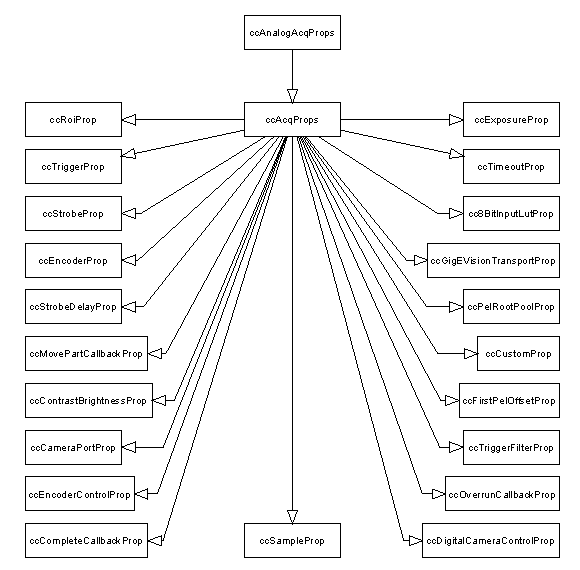
Class diagram of acquisition FIFO property classes

Note: Earlier versions of CVL used two classes, ccAcqProps and ccAnalogAcqProps, to define FIFO properties. All of the acquisition properties are now contained in ccAcqProps, and ccAnalogAcqProps has been deprecated.

The properties() member function for ccStdGreyAcqFifo, ccStdRGB16AcqFifo, and ccStdRGB32AcqFifo returns a ccAcqProps object that enables you to work conveniently with properties that apply to acquired images.