Persistent Camera Enumeration
In this section, Persistent Camera Enumeration (PCE) is discussed. PCE is relevant only to GigE cameras in this release.
When your CVL application launches, CVL automatically generates a list of all connected GigE Vision cameras. The list orders cameras by their IP addresses that you set with the GigE Vision Configurator utility. You application can get a reference to a camera in this list by calling ccGigEVisionCamera::get().
Normally (without using dynamic discovery), this camera list remains unchanged until the application exits, regardless of any GigE Vision cameras you connect to your production environment.
If your multi-camera application relies on a specific camera being returned by ccGigEVisionCamera::get(), problems can occur if the cameras are unpowered or not connected when the application launches.
For example, in an application with two GigE cameras, where CAM1 is normally returned by ccGigEVisionCamera::get(0) and CAM2 is returned by ccGigEVisionCamera::get(1), consider what happens if a problem prevents CAM1 from powering on.
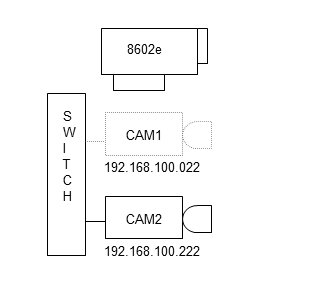
CAM1 not powering on
Without PCE, ccGigEVisionCamera::get(0) will return a reference to CAM2, and ccGigEVisionCamera::get(1) will throw an exception.
With PCE, the cameras expected by your application are enumerated from the VPCameraOrder.ini file. Thus, in the example above, ccGigEVisionCamera::get(0) will still return a reference to CAM1, but it will not be functional because the camera is not actually present. Calling ccGigEVisionCamera::get(1) will return a reference to CAM2 as expected. This situation is analogous to if both cameras were present when the application started, but CAM1 was removed while the application was running. If CAM1 is (re)attached, it will become functional without the need to restart the application.