Acquisition Example
There are seven basic steps, and one optional step, to acquire images using CVL.
- Get a reference to the frame grabber object.
- Select a video format for the camera connected to the frame grabber.
- Create an acquisition FIFO using the video format and frame grabber information.
- Disable triggers.
- Optionally, set any required properties of the acquisition FIFO.
- Set the trigger model and enable triggers. See also Trigger Models.
- Start the acquisition manually by invoking a function (start() only) or automatically using an external input line (trigger).
- Complete the acquisition and get a pel buffer that contains the acquired image.
The following code illustrates these steps. The sections that follow discuss each of these steps in more detail.
The following example is designed to illustrate several techniques in a small amount of space. In an actual vision application, use only those techniques that are appropriate for your application. See General Recommendations.
Starting with CVL 6.0, you must #include acq.h, prop.h, and vidfmt.h explicitly.
#include <ch_cvl/vp8100.h>
#include <ch_cvl/callback.h>
#include <ch_cvl/acq.h>
#include <ch_cvl/prop.h>
#include <ch_cvl/vidfmt.h>
#include <ch_cvl/constrea.h>
class MyPartMover: public ccCallback
{
virtual void operator()(); // override
};
// Define your callback function as an override of operator()
// of your callback class.
void MyPartMover::operator()()
{
// Place code here to signal your part mover thread that it
// is ok to move the part. Do not perform lengthy operations
// or call CVL functions in a callback function.
}
int cfSampleMain(int, TCHAR** const)
{
// Step 1: Get a frame grabber (see also Class diagram of MVS-8000 series and other hardware classes)
cc8100m& fg = cc8100m::get(0);
// Step 2: Select a video format
const ccStdVideoFormat& fmt =
ccStdVideoFormat::getFormat(cmT("Sony XC-ST50 640x480"));
// Step 3: Create an acquisition FIFO
ccAcqFifoPtrh fifo = fmt.newAcqFifoEx(fg);
// Step 4: Disable triggers
fifo->triggerEnable(false);
// Step 5: Set the FIFO properties. (See the Using
// Callback Functions section of this chapter for
// an alternate way to register your callback function.)
fifo->properties().exposure(20e-3);
fifo->properties().movePartCallback(new MyPartMover);
// Step 6: Set the trigger model and enable triggers.
// cfManualTrigger() is the default trigger model setting.
// Thus, the next line is included for illustration.
fifo->triggerModel(cfManualTrigger());
fifo->triggerEnable(true);
// Step 7: Acquire images.
// The initial start() gets the acquisition
// engine’s queue started, which speeds up overall
// acquisition.
fifo->start();
for (int i = 0; i < 10; ++i)
{
ccAcquireInfo info;
// Step 8: Get a pel buffer with the image.
ccAcqImagePtrh img = fifo->completeAcq(
ccAcqFifo::CompleteArgs().acquireInfo(&info));
ccPelBuffer<c_Uint8> pb = img->getGrey8PelBuffer();
// Start the next acquisition.
fifo->start();
if (info.failure())
{
cogOut << cmT("Acquisition failed. ")
<< (info.failure().isMissed() ?
cmT("Reason: missed trigger.") :
info.failure().isAbnormal() ?
cmT("Reason: abnormal failure.") :
cmT("Unknown reason."))
<< std::endl;
continue;
}
// Process this image.
cogOut << cmT("Acquired image size: ")
<< pb.width() << cmT("x") << pb.height() << std::endl;
// pb goes out of scope here, freeing the pel buffer and the
// acquired image.
}
// FIFO goes out of scope here, destroying the ccAcqFifo
// object, terminating any remaining outstanding acquisitions.
return 0;
}
Classes representing Cognex hardware all derive from the ccBoard, ccFrameGrabber, and ccParallelIO classes. (Remember that for GigE applications, the camera is the frame grabber.)
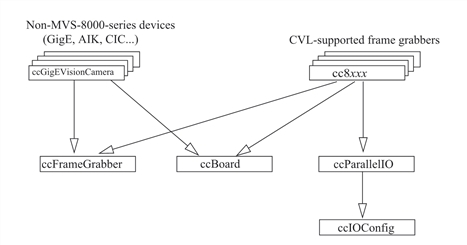
Class diagram of MVS-8000 series and other hardware classes
Step 1 of the preceding program addresses a specific type of board (an MVS-8100M) by instantiating one of the derived frame grabber classes (cc8100m) and getting a reference to the MVS-8100M frame grabber with cc8100m::get(). You can make your application more generic so that it runs with any frame grabber by instantiating a ccFrameGrabber instead of a class representing a specific type of board, and getting a reference to this generic frame grabber with ccFrameGrabber::get().