Generic Features Finder
This block allows the configuration of multiple generic feature finders (for example, a feature finder). When executed in a sequence, this block runs the configured finders on its input images and outputs a list of the found features and graphics.
This block has three modes of operation:
-
Setup Mode - An interactive editor is used to add, remove or modify the feature finders. A version of this interactive editor is available in the HMI Toolbox, under AlignPlus->Alignment->Generic Features Finder. Alternatively, the public methods provided by the block can be used for this purpose.
-
Reference Part Mode - The block is executed and the feature finders will be run as they should be on a reference part.
-
Runtime Mode - The block is executed and the feature finders will be run as they should be for a runtime part.
This block supports only custom feature finder:
-
A custom feature finder, represented by a VisionPro CogToolBlock. The tool block contains input terminals to receive an image set from a single camera and output terminals to return the located generic feature results. The tool block can use all the images in the image set to locate a single feature.
When adding feature finders, a given input image can have multiple feature finders configured for it, and some input images need not have any feature finders.
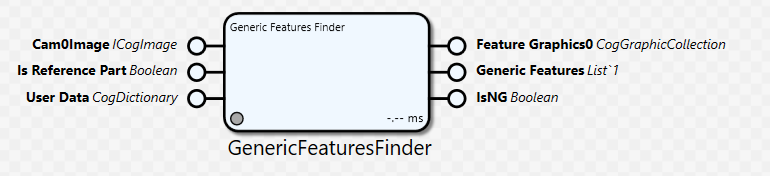
The output result for the block is a list of elements of type CogAlpsGenericFeature, where each entry will have the feature location, a Boolean that indicates if the feature was found, a camera identifier and an image identifier. Additionally, the block will output a set of graphics of type CogGraphicCollections, one for each camera, which can be used to display the features location graphics. Each collection will contain the graphics generated by all the feature finders for the corresponding camera. It is expected that a collection will be combined with an appropriate image to generate a VisionPro record for display.
General Information
Class name: GenericFeaturesFinderBlock
Namespace: Cognex.Designer.AlignPlus.Alignment
Assembly: Cognex.Designer.AlignPlus.Alignment.dll
Inputs
|
Name |
Type |
Description |
|---|---|---|
|
Cam0Image |
ICogImage |
The image from camera 0. A corrected image should be supplied on this pin. Additional pins will be created based on the Number Of Cameras property. Pins of this type will be displayed only if the Number Of Images Per Camera property is equal to one. |
|
Is Reference Part |
Boolean |
If true, when executed the block computes features on a reference part. If false, when executed the block will behave as it should for a run time part. For custom tool block, it depends on user how to utilize this parameter |
|
User Data |
CogDictionary |
Contains a CogDictionary with user specified data. This data will be forwarded to all finders When there is no data needed, still an empty user data need to link to this pin, otherwise, tool block will consider this pin as null and pop out an error when running |
Outputs
|
Name |
Type |
Description |
|---|---|---|
|
Feature Graphics0 |
CogGraphicCollection |
The graphics generated by all the feature finders for camera 0. Additional pins of this type will be created based on the Number Of Cameras property. Each graphic will be in the Selected Space for this block. Custom feature finder tool blocks must generate all results and graphics in the Selected Space. Additional logic (such as the CogRecord Creator block) can be used to combine these graphics with an image, for display in a VisionPro Display. |
|
Generic Features |
List<CogAlpsGenericFeature> |
Contains a list of generic features. Each item in the list corresponds to the results of a single feature finder. Each item will contain the feature location and a Boolean indicating if the feature was found. There is no particular order in which the generic features are output, however the order does not change until another feature finder has been added. |
|
IsNG |
Boolean |
True: features are all found False: one or more features are not found |
Properties
|
Parameters |
Type |
Description |
|---|---|---|
|
Number of Cameras |
Integer |
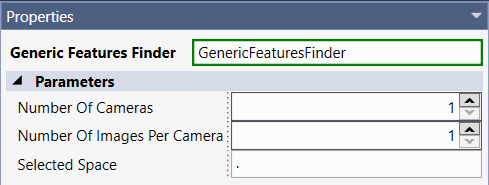
Get/set the number of cameras supplying images to this block
|
|
Number of Images Per Camera |
Integer |
Get/set the number of cameras supplying images to this block. If this property is greater than one, then the block will accept image sets (CogImageCollections) for its input pins. The purpose of accepting an image set from each camera is to allow feature location to be performed on images captured under different acquisition conditions from a single camera.
|
|
Selected Space |
String |
Get/set the selected space in which the finders run. The selected space is the coordinate system in which all feature finders return results (such as locations, distances and graphics) and in which the tools interpret input data (such as regions of interest).
If the selected space is not present in the coordinate space tree of an image to be used for feature location, a suitable exception will be thrown when the sequence block is executed. |