Placement Limit Checker
Alignment displacement limit check is a function to check whether output x, y and theta values provided by the pose computer are within certain limits. If they are, then alignment check will be OK. Otherwise, it will be NG. This function can be found in System category in setup mode.
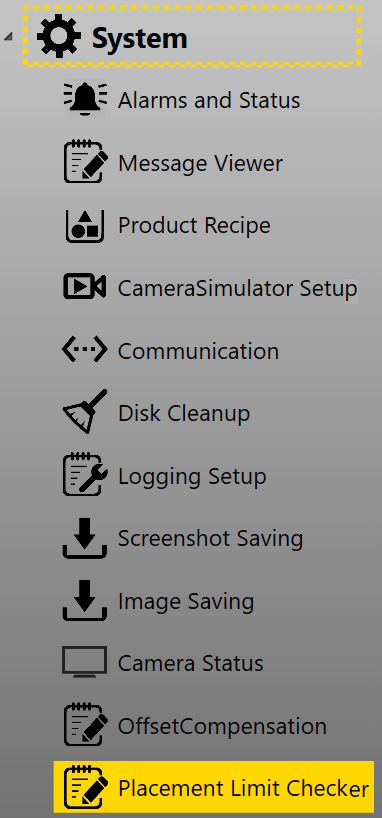
Here are the steps to set placement limit:
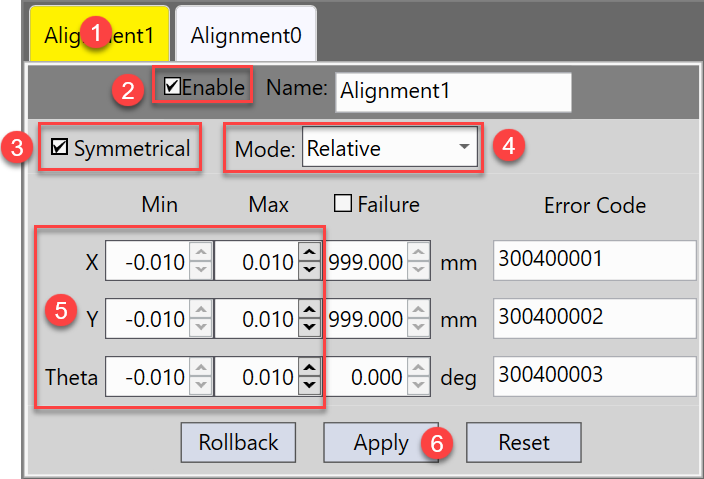
- Select the station that needs placement limit check.
- Check on Enable option.
- Select if upper and lower limits should be symmetrical or not.
- Choose to input relative limits or absolute limits.
-
Input upper(Max) and lower(Min) limits for X, Y and Theta values.
If Symmetrical is checked on, then you only needs to input upper limits as lower limits will be generated automatically.
- Click Apply to save those limits.
- Save the current alignment recipe.
Besides upper and lower limits, you can also specify default values when check result is NG so that external devices can easily identify it is a NG case. The default NG values for X, Y, and Theta are 999.000, 999.000, and 0 respectively. If these default values are what you need, check on Failure option first, and then you can edit them.
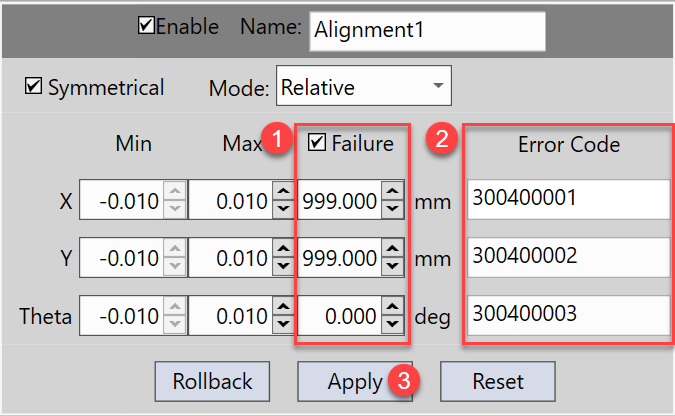
Also, specific error codes are assigned when limit check is NG. The error code will be forwarded to external device so that it knows which specific value has failed the placement limit check. You can also edit these error codes here according to your own needs.
After all changes are done, click Apply and save the alignment recipe again.