Cameras and Lights for Calibration
Camera and lights page, located under Calibration category, is used to configure cameras and lights for calibrations.
This page consists of two sub pages: Global Settings and Exposure Settings. Global Settings page is for camera hardware selection and global parameters setting. Exposure Settings page is for individual parameters setting for each calibration when the corresponding global parameters are disabled.
Global Settings
Global Settings include camera settings and lighting settings.
Camera Settings
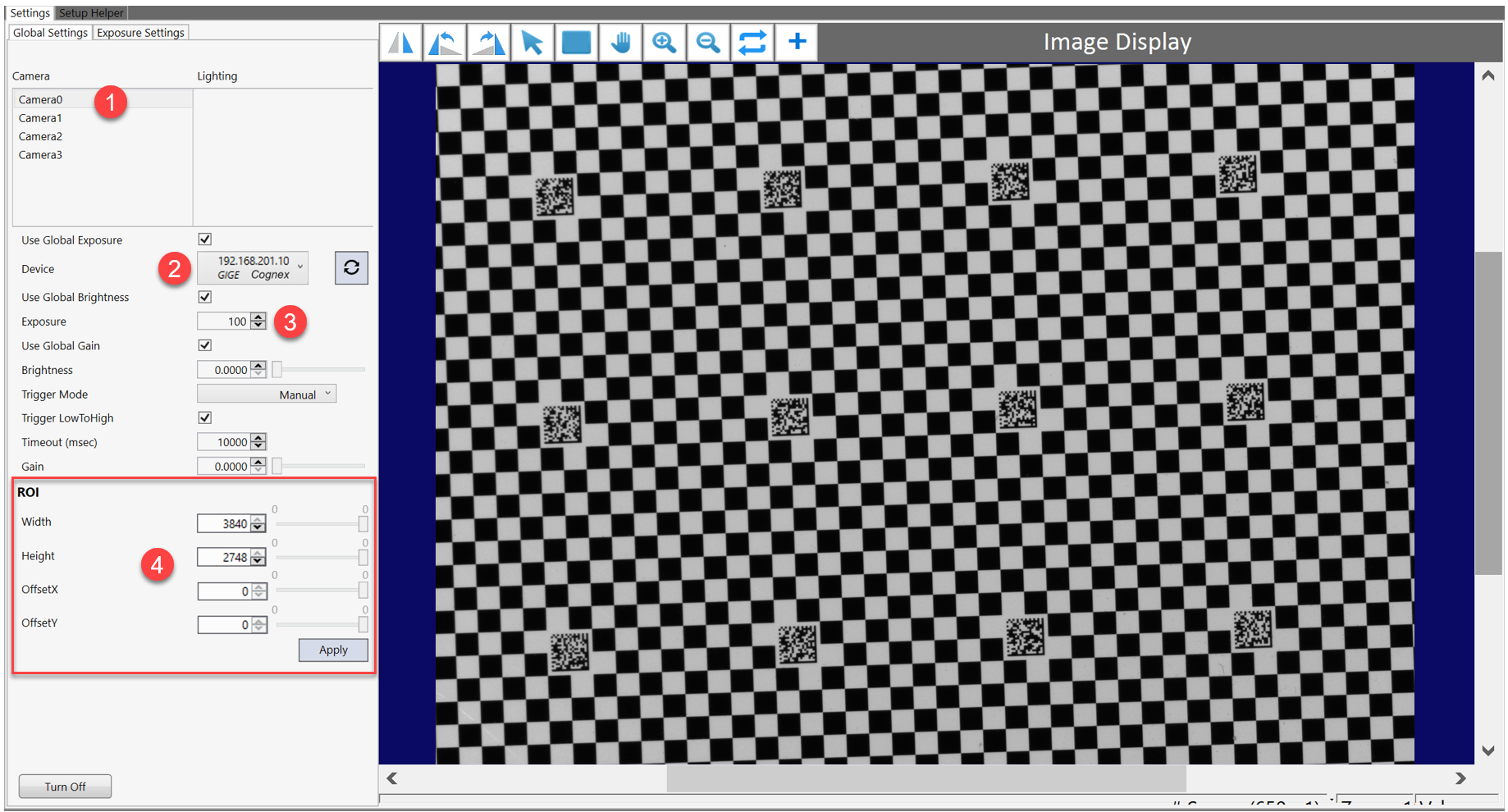
Global Settings allow users to select camera hardware devices for calibration, and set their global exposures/brightnesses/gains.
The steps are:
- Select a camera device from camera list (These are camera devices configured in the Configuration Wizard).
-
Select the corresponding camera hardware device from Device list.
- Set proper exposure/brightness/gain for each camera to obtain images of appropriate contrast in live mode.
-
Specify ROI (Region Of Interest) of the select camera which allows the camera acquires images only from within the configured ROI.
By default, ROI uses the whole image area. However, users can make it smaller to save image acquisition and processing time. ROI setting is a setting of camera hardware, therefore it effects all images acquired by this camera no matter it is used for calibration or feature finding.
| Item | Content/Type | Description |
|---|---|---|
| Use Global Exposure | Boolean |
True: use the same exposure time for this camera whenever it is used for a calibration False: use local exposure times for different calibrations when this camera is used |
| Device | / | List of all connected camera hardware devices with information of their IP addresses (if they are GIGE Cameras) or serial numbers (if they are USB3 cameras), and brand names. Click  button to update if a connected camera is not listed button to update if a connected camera is not listed |
| Use Global Brightness | Boolean |
True: use the same brightness for this camera whenever it is used for a calibration False: use local brightnesses for different calibrations when this camera is used |
| Exposure | Double(in ms) | Set exposure time for the selected camera |
| Use Global Gain | Boolean |
True: use the same gain for this camera whenever it is used for a calibration False: use local gains for different calibrations when this camera is used |
| Brightness | Double | Set the brightness value for each image acquisition. |
| Trigger Mode | Manual/Auto/Semi |
Manual: Software triggering. Auto: Acquires when it detects a transition on an external line. Semi: Acquires when the software is running and the external line detects a transition. |
| Trigger LowToHigh | Boolean | Image acquisition is triggered on the rising edge of the trigger signal when Trigger Mode is set as auto or semi-auto |
| Timeout(msec) | Integer | Set a timeout period that determines how long the acquisition device waits for an image to become available before the application generates a timeout error. |
| Gain | Double | Increasing brightness of image by amplifying both signal and noise received from each pixel. Not recommended to increase this value when there are other options to improve image brightness. |
| Width | Unsigned Integer | The width of the ROI |
| Height | Unsigned Integer | The height of the ROI |
| OffsetX | Unsigned Integer | The x-value of the origin of the ROI |
| OffsetY | Unsigned Integer | The y-value of the origin of the ROI |
Lighting Settings
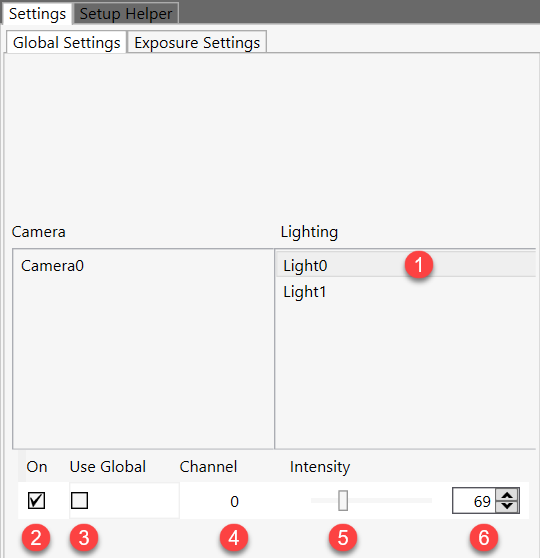
A light controller added in the Configuration Wizard can be configured on this page for its global parameters.
| Item | Description |
|---|---|
| Lighting |
Available light controllers |
| On/Off | Turn the selected channel's light on/off for image acquisition of the selected camera |
| Use Global |
True: use the same intensity for this channel of light whenever it is used for a calibration. False: use local intensities for different calibrations when this light is used |
| Channel | The channel index of selected light controller (the total number of channels for each controller is configured in the Configuration Wizard). |
| Intensity slide bar | Increase or decrease intensity of this channel by sliding the bar right or left (this function is convenient to monitor intensity changes on live image). |
| Intensity edit box |
Input the intensity of current channel manually, the minimum value is 0, maximum is 255. |
Exposure Settings
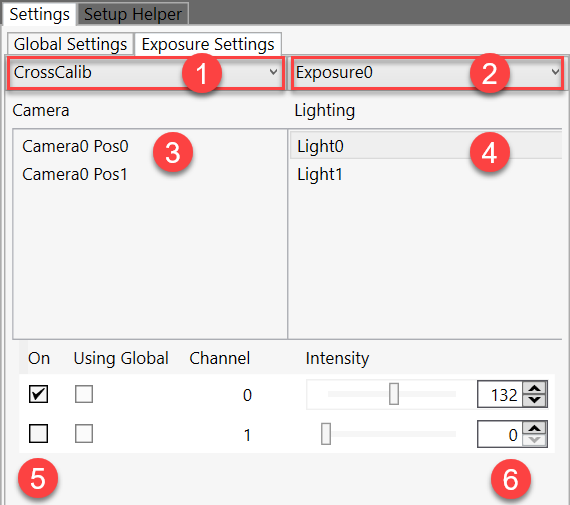
When a global exposure/brightness/gain of a camera or a global intensity of a light channel is disabled, the corresponding local values for different calibrations should be configured individually on Exposure Settings page. Otherwise, this page can be skipped.
Camera Settings
The setting steps are:
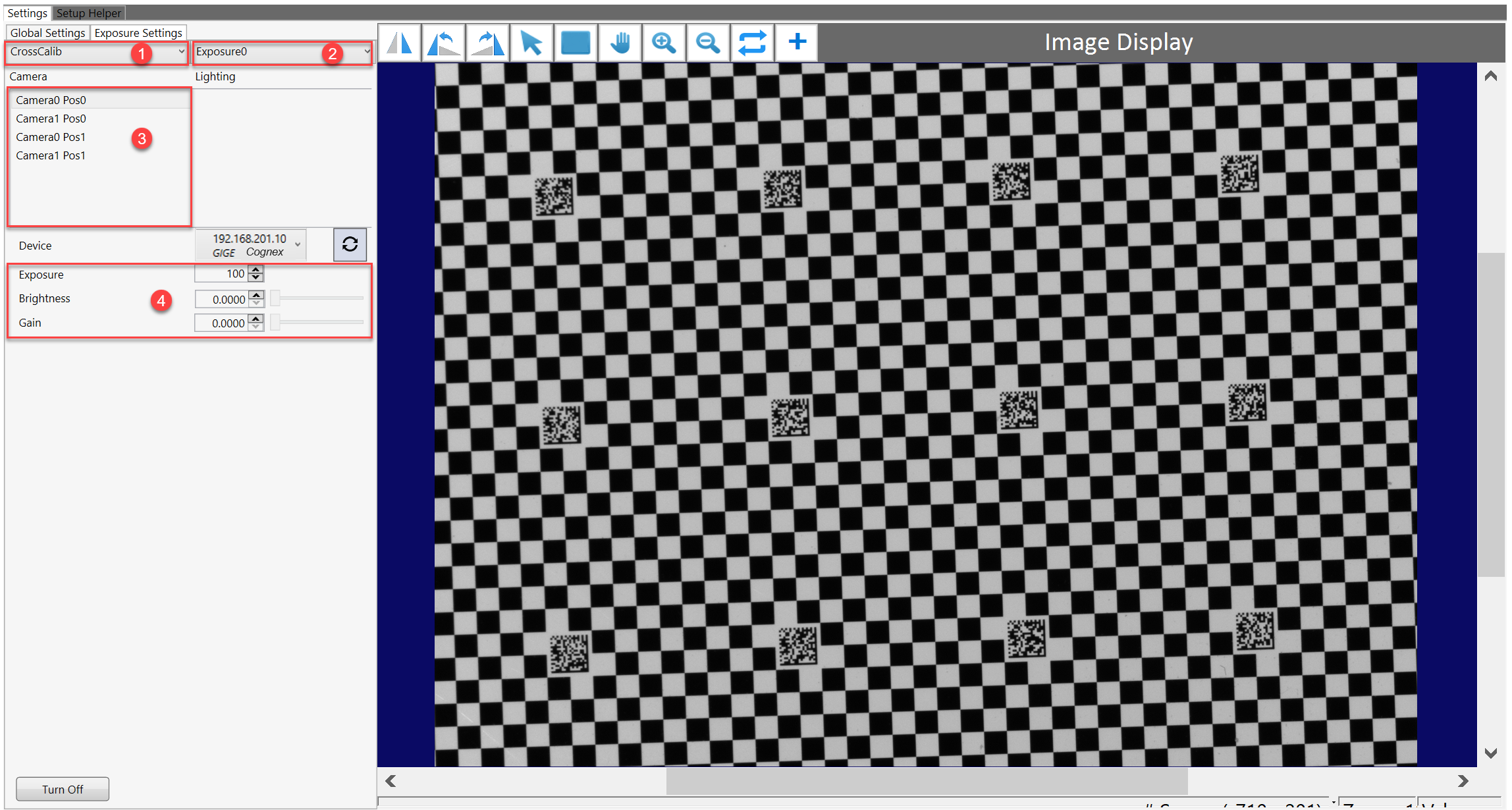
- Choose one calibration.
-
Choose acquisition.
There is only one acquisition (only Exposure0) for one position in a calibration.
- Choose camera position.
- Set exposure/brightness/gain for current position.
- Walk through all calibrations and all positions to set exposures/brightnesses/gains individually.
Lighting Setting
The lighting setting steps are:
-
Choose a calibration from the calibration list
-
Select an acquisition
-
Select a camera position
-
Select a light controller, configure the on/off status and intensity for each of its channels
-
Choose another light controller, configure the on/off status and intensity for each of its channels
-
Walk through all calibrations and all acquisitions to set up their lighting respectively.