Checker Grid Feature Extractor
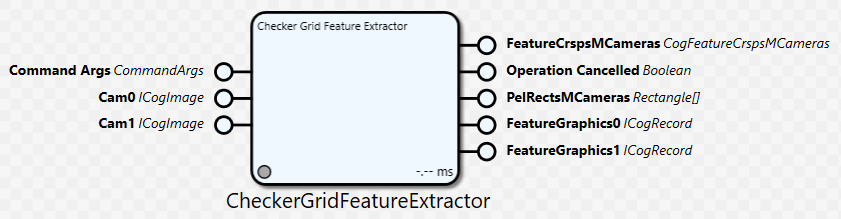
This block extracts the calibration features from a checkerboard calibration plate. It can be configured to extract calibration features from the images of multiple cameras, where the number of cameras is configured via a property. This block is a Cognex Designer wrapper for the VisionPro CogCalibFeatureExtractorCheckerboard operator and implements most of its functionality.
This feature extractor operates with a checkerboard style calibration plate consisting of a grid of alternating light and dark checkers. For each image of a checkerboard, the extractor locates the vertices of checkers in the image and generates a correspondence of vertex locations in image with vertex locations on the physical calibration plate coordinate system (Plate2D, see the remarks section of Cognex.VisionPro.CalibFix.CogCalibFeatureExtractorCheckerboardLabelModeConstants in the VisionPro documentation). The image point in the correspondence pair data will be in the selected space of the image.
The block supplies the script point "CurrentProgress". This script point will be called with suitable arguments to allow the monitoring of the feature extraction process during execution.
General Information
Class name: CheckerGridFeatureExtractorBlock
Namespace: Cognex.Designer.AlignPlus.Calibration
Assembly: Cognex.Designer.AlignPlus.Calibration.dll
Inputs
|
Name |
Type |
Description |
|---|---|---|
|
Command Args |
CommandArgs |
CommandArgs object which contains description of command for setup-wizard program. For non-setup-wizard program, this input pin can be left as unlinked. |
|
Cam0 |
ICogImage |
The image from camera 0. Additional pins of this type are added based on the Number Of Cameras property. |
Outputs
|
Name |
Type |
Description |
|---|---|---|
|
FeatureCrspsMCameras |
CogFeatureCrspsMCameras |
The correspondence pair data extracted from all the input images. |
|
Operation Cancelled |
Boolean |
True if the feature extraction was cancelled during execution. |
|
PelRectsMCameras |
Rectangle[] |
The bounds of the input image, by default each rectangle is of the same size of image it refers to. |
|
FeatureGraphics0 |
ICogRecord |
CogRecord Creator which shows all vertexes of tiles extracted by CheckerGridFeatureExtractor, Additional pins of this type are added based on the Number Of Cameras property. |
Definition of FeatureCrsp
Each point has two sets of coordinates: Raw2D coordinates(x,y) and Plate2D coordinates(X,Y), these two sets of coordinates then are stored in a structure called FeatureCrsp.
One point is represented by one FeatureCrsp, a group of points in one image then are called FeatureCrsps.
Multi cameras’ FeatureCrsps there after is named as FeatureCrspsMCameras, and if that Multi cameras has features extracted at different stage locations, then all the features are grouped as FeatureCrspsMCamerasNPoses
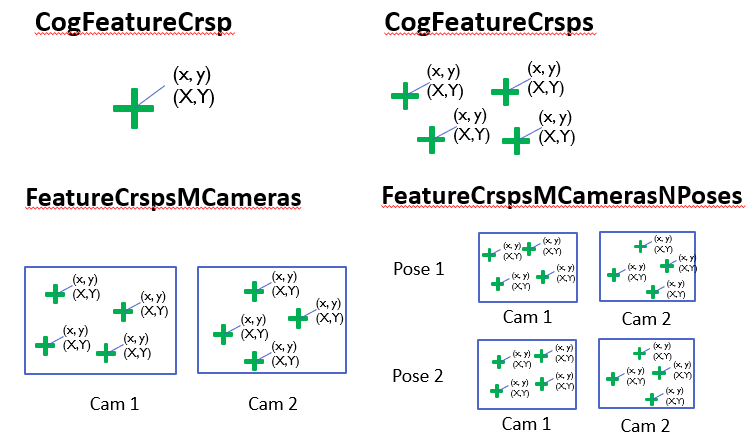
For Checker Grid Feature Extractor, it extracts features from multi cameras at a certain position, so the major output is a FeatureCrspsMCameras object, which later is accumulated by Cal Plate Feature Accumulator.
Properties
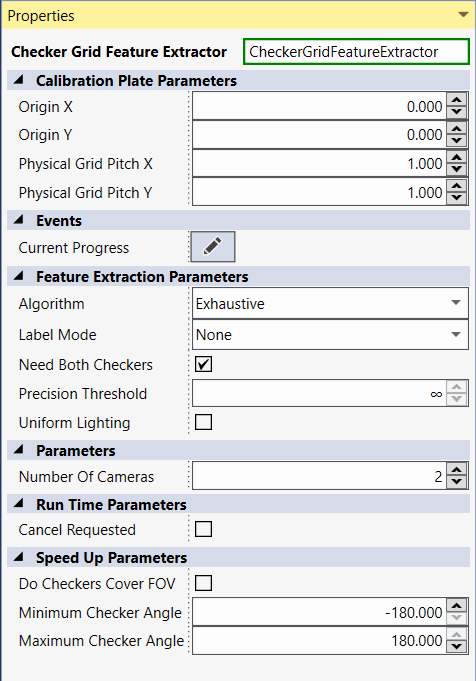
The properties are described below in different groups:
-
Calibration Plate Parameters
|
Name |
Type |
Description |
|---|---|---|
|
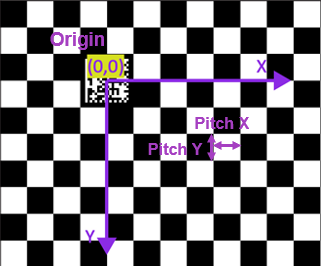
OriginX |
Double |
Gets/sets the the x value of the designated origin to be used for labeling of returned feature points. The vertex closest to point (OriginX, OriginY) will be used as the origin for point correspondence when Label Mode is CogCalibFeatureExtractorCheckerboardLabelModeConstants.UseOrigin. When not operating in CogCalibFeatureExtractorCheckerboardLabelModeConstants.UseOrigin mode, this property is ignored. |
|
OriginY |
Double |
Gets/sets the the x value of the designated origin to be used for labeling of returned feature points. The vertex closest to point (OriginX, OriginY) will be used as the origin for point correspondence when Label Mode is CogCalibFeatureExtractorCheckerboardLabelModeConstants.UseOrigin. When not operating in CogCalibFeatureExtractorCheckerboardLabelModeConstants.UseOrigin mode, this property is ignored. |
|
Physical Grid Pitch X |
Gets/sets the physical units of grid pitch along the x-axis of the calibration plate coordinate system (Plate2D, see the remarks section of Cognex.VisionPro.CalibFix.CogCalibFeatureExtractorCheckerboardLabelModeConstants). It is the distance between any two adjacent checker vertices whenever the line joining them is parallel to the x axis of Plate2D. Throws System.ArgumentOutOfRangeException: The value is less than or equal to 0. |
|
|
Physical Grid Pitch Y |
Gets/sets the physical units of grid pitch along the y-axis of the calibration plate coordinate system (Plate2D, see the remarks section of Cognex.VisionPro.CalibFix.CogCalibFeatureExtractorCheckerboardLabelModeConstants). It is the distance between any two adjacent checker vertices whenever the line joining them is parallel to the y axis of Plate2D. Throws System.ArgumentOutOfRangeException: The value is less than or equal to 0. |
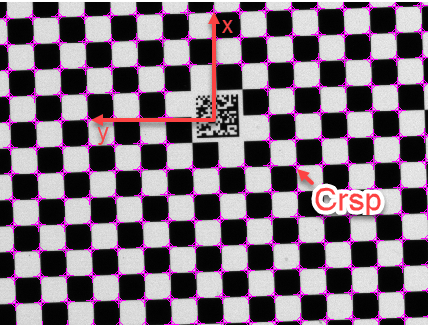
The figure below indicates the meaning of Origin, PitchX, and PitchY:
-
Feature Extraction Parameters
|
Name |
Type |
Description |
|---|---|---|
| Algorithm |
Cognex.VisionPro.CalibFix. CogCalibCheckerboardFeatureFinderConstants |
Please refer to Feature Extractor |
| Label Mode |
Cognex.VisionPro.CalibFix. CogCalibCheckerboardFiducialConstants |
Please refer to Feature Extractor |
| Need both checkers | Boolean | Gets/sets the flag to indicate whether the tool should find only vertices shared by two interior light checkers. When set to true, the extractor will find only those vertices belonging simultaneously to two interior light checkers. An interior checker is one that does not touch the image boundary or the border of the calibration plate. When set to false, the extractor will attempt to find all vertices of all interior light checkers. |
| Precision Threshold | Double | Gets/sets the threshold for discarding vertices with excessive positional uncertainty, specified in pixels. Due to noise and distortion, there are errors in the computed vertex positions. The algorithm internally estimates the position uncertainty for all found vertices, and excludes those from the final result whose position uncertainty estimates exceed the threshold specified here. Throws System.ArgumentOutOfRangeException: If the input value is less than 0 in the setter. |
| Uniform Lighting | Boolean | Gets/sets the flag to indicate whether the checkerboard is expected to be uniformly illuminated in the run-time images. When set to true, the extractor expects the light checkers to be uniformly illuminated, and uses an efficient technique for finding the vertices which can improve the speed performance. However, if in fact the illumination is not uniform, this technique may not find certain vertices that are severely affected by the non-uniform lighting. When set to false, the tool performs better in presence of severe non-uniform lighting, and may find more vertices in these cases. |
-
Parameters
|
Name |
Type |
Description |
|---|---|---|
| Number of Cameras | Int32 | Sets/Gets the number of cameras supplying images to the feature extractor. This property has a minimum value of MinNumberOfCameras (1) and a maximum value of MaxNumberOfCameras (16). The number of CamN and FeatureGraphicsN pins are each equal to the NumberOfCameras property. The available pins change immediately upon a change of this property. Throws System.ArgumentOutOfRangeException: If the setter value is less than MinNumberOfCameras or greater than MaxNumberOfCameras |
-
Runtime Parameters
|
Name |
Type |
Description |
|---|---|---|
| Cancel Requested | Boolean | Gets/sets if a cancel was requested. If this property is set to true before or during execution, the feature extraction is cancelled. |
-
Speed Up Parameters
|
Name |
Type |
Description |
|---|---|---|
| Do Checkers Cover FOV | Boolean | Gets/sets whether the checkers are expected to entirely cover the field of view. Note that the purpose of this property is to improve speed performance when the checker coverage is known. This property should only be set to true if it is known beforehand that the checkers will cover the entire image for each camera at each pose. Note that Do Checkers Cover FOV is only used when Algorithm is Cognex.VisionPro.CalibFix.CogCalibFeatureExtractorCheckerboardAlgorithmConstants.Exhaustive. |
| Minimum Checker Angle | Double | Gets/sets the minimum expected angle of checker orientations. Note that if the new value is larger than Maximum Checker Angle, then Maximum Checker Angle will be changed to the new Minimum Checker Angle. The purpose of Minimum and Maximum Checker Angle is to improve speed performance when the checker orientations are known. Minimum and Maximum Checker Angle are only used when Algorithm is Cognex.VisionPro.CalibFix.CogCalibFeatureExtractorCheckerboardAlgorithmConstants.Exhaustive. |
| Maximum Checker Angle | Double | Gets/sets the maximum expected angle of checker orientations. Note that if the new value is smaller than Minimum Checker Angle, then Minimum Checker Angle will be changed to the new Maximum Checker Angle. The purpose of Minimum and Maximum Checker Angle is to improve speed performance when the checker orientations are known. Minimum and Maximum Checker Angle are only used when Algorithm is Cognex.VisionPro.CalibFix.CogCalibFeatureExtractorCheckerboardAlgorithmConstants.Exhaustive |
Current Progress Script
Current Progress script provides information on the current progress of feature extraction
CurrentProgress(Cognex.VisionPro.CalibFix.CogCalibFeaturesExtractedEventArgs CurrentProgress)
Script point called periodically during the execution of feature extraction.
Published Methods
Void ResetBlock()
This method resets this block to a default state.