Settings
The Settings page of the RTM app lists all discovered devices on the network, provides options to subscribe for various statistical data from a reader or groups of readers. The window consists of a Top ribbon, where the Main Menu, the user info, the About section, and the Log out button resides. The window also consists of the Dashboard which contains information and settings options for all readers, standalone or in a group.
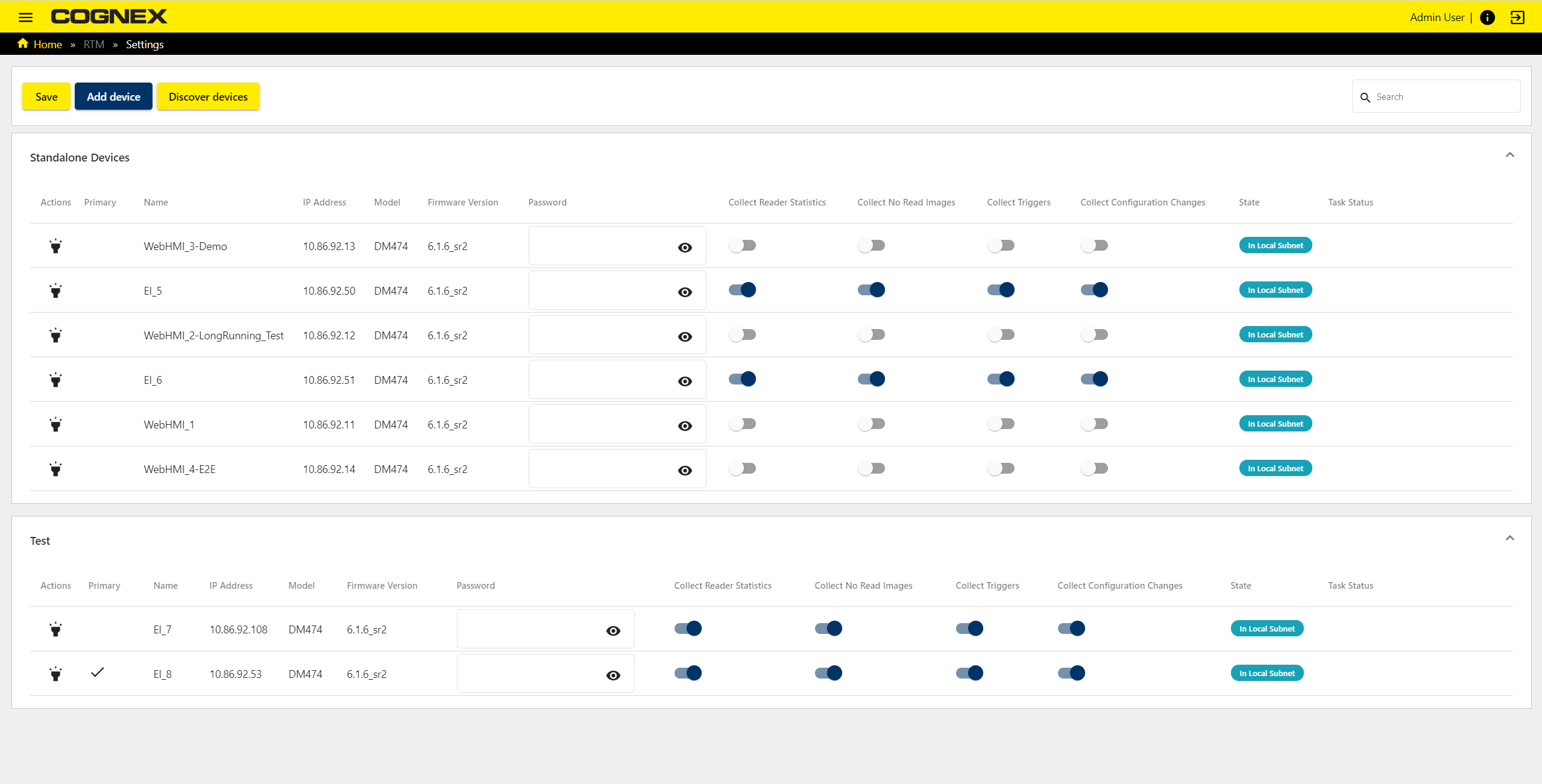
| Item | Description |
|
Action ribbon |
Ribbon contains actions that can be performed on this page: Save - To save changes to the settings of a reader Add Device - To manually add a device not automatically recognized by the RTM app Discover devices - To trigger the RTM app to find more devices on the network |
|
Standalone reader list |
A table view of the settings of the standalone readers that are discovered on the network with options that can be enabled or disabled for the reader |
|
Grouped reader list |
Table views of the readers in a group sorted alphabetically by group name with options that can be enabled or disabled for the individual reader |
| Search Field |
Allows searching for a reader by Name, Model or Firmware version |
The table view of the standalone or group readers displays information and allows setting changes to the individual readers.
| Column Title | Description |
|
Actions |
To flash led, click on the Flash icon |
|
Primary |
A check mark signifies the primary reader |
|
Name |
A customizable name of the reader |
|
IP address |
The IP address of the reader |
|
Model |
The type of the reader |
| Firmware version |
The version of firmware installed on the reader |
|
Password field |
Password of the user allows making changes to the settings |
|
Collect Reader Statistics |
Enable or disable collecting statistics from the reader |
|
Collect No Read images |
Enable or disable collecting No Read images from the reader |
|
Collect Triggers |
Enable or disable collecting triggers from the reader |
|
Collect Configuration Changes |
Enable or disable collecting configuration changes from the reader |
|
State |
Displays the state of the reader, which can be:
|
| Task status |
Displays the status of the task |